Level up your business security with free, on-demand training and certification. Explore 1Password Academy today →
Forum Discussion

Anonymous
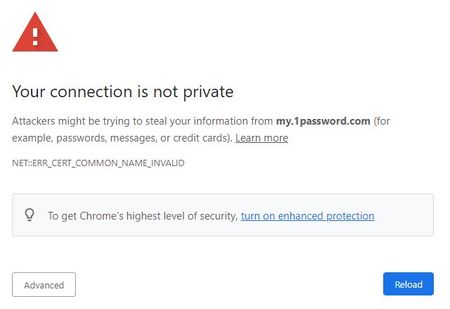
4 years agoChrome: "Your connection is not private" and "unable to save item" errors all of a sudden
Been using the 1Password extension for Chrome both at home on my Mac and at work on Windows with absolutely no issues until today. All of a sudden when I clicked on the extension in Chrome, clicked ...
Anonymous
4 years ago@ag_ana ag_chantelle
Also wanted to let you know I also tried uninstalling and then reinstalling Chrome just now, but it's still not working. I get the same error as shown in my OP. But this time I clicked on the "Advanced" button and took a screenshot of the entire thing in case this helps you guys resolve the issue. I'm trying to insert the image here, but NOW the insert image button isn't working! It's "hidden" behind this text area and I can't see the options to click on. The insert link button doesn't do that. So strange! I've taken a screenshot of this too. Happens in both Chrome and Firefox
Here is a link to both screenshots, since I'm not able to insert the images in this post:
https://drive.google.com/file/d/1X8R8c5_cB5p6EDwiwG8Ub-hudvNUyWeD/view?usp=sharing
https://drive.google.com/file/d/1pJuNnZPjjRZGFVLhG70kzmZj6tto1zje/view?usp=sharing


