Level up your business security with free, on-demand training and certification. Explore 1Password Academy today →
Forum Discussion

asdfasdf3211
2 years agoNew Contributor
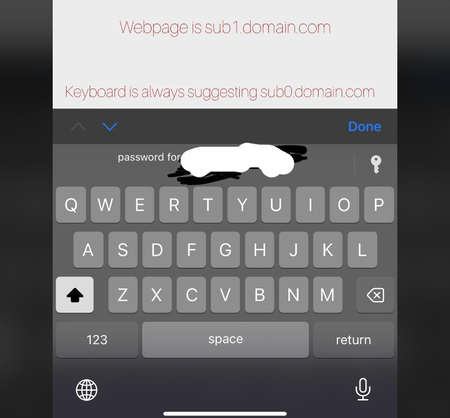
Exact domain match doesn’t work on keyboard suggestions
I have several records of the same domain but with different subdomains. I have set them to only match exact domain. It works when the 1P is open through clicking the key icon, however the automatic ...

Kester_D_1P 1Password Team
2 years ago1Password TeamHi asdfasdf3211 - the suggestions placed directly above your keyboard are put there by iOS Password AutoFill, based on your 1Password data. I'm afraid that 1Password isn't able to apply any autofill behaviours that you've set until you tap the "🔑" / "🔑 Passwords" button to open the 1Password AutoFill interface.
If you find that you're frequently seeing the incorrect item suggested by iOS Password AutoFill, you can disable the suggestions:
- Open and unlock 1Password for iOS.
- Tap the icon for your account or collection at the top left and choose Settings > AutoFill.
- Disable Show filling suggestions.
With this setting disabled, you'll always see the "🔑 Passwords" button, allowing you to open 1Password and view suggestions based on the autofill behaviours that you've set.
If you use Safari as your browser, you can set up 1Password for Safari, which will always make suggestions based on your settings: Get to know 1Password for Safari on your iPhone or iPad




