Level up your business security with free, on-demand training and certification. Explore 1Password Academy today →
Forum Discussion

SquareWheels
2 months agoNew Contributor
Firefox
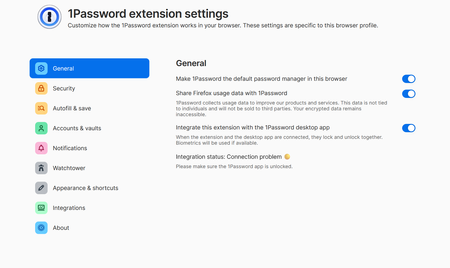
I am trialing 1Password. I am using Firefox. Every time I close the browser, I get logged out. I am logged in to 1Password, but the General settings says it's locked. What am I missing? Thanks ...
 2 months ago
Hi SquareWheels,
It looks as if there's a problem with the connection between the 1Password desktop app and Firefox extension. When the two aren't connected, the extension will lock whenever your browser is closed.
Could you make sure that you have the latest version of the 1Password desktop app installed, then if the connection problem persists, follow the steps below:
1. Open your browser, right-click the 1Password icon in the toolbar, and choose Settings.
2. Under the General section, disable Integrate this extension with the 1Password desktop app.
3. Close your browser completely.
4. Press the Windows key on your keyboard, type 1Password, click on it, unlock the app if prompted, then click ⋮ in the top left, and select Settings.
5. Ensure the following settings are turned on:- Under General, make sure Keep 1Password in the notification area is checked.
- Under Browser, make sure Connect with 1Password in the browser is checked.
6. Press Ctrl + Q to fully quit the app, or right click the 1Password app icon in your system tray, and select Quit.
7. Re-open the 1Password app, and unlock it.
8. Open your browser again, sign into 1Password, and then turn Integrate this extension with the 1Password desktop app back on.
9. Test using 1Password again.
If you're still seeing the same issue after trying the above, let me know.
1P_Gem Moderator
2 months agoModeratorHi SquareWheels, thanks for your reply! It's expected that 1Password will lock when you restart your device, and this can't be changed, however when all is working well, this shouldn't break the connection between the app and extension, and you should be able to lock and unlock both together.
If you check the browser extension settings menu again, is it back to showing Integration status: Connection problem 🟡?
If it is, I'd like to have our team investigate further. Could you create and share a 1Password diagnostics report from the 1Password desktop app:
Send a diagnostics report (Windows)
Attach the diagnostics to an email message addressed to: support@1password.com
With your email please include:
- A link to this thread: https://www.1password.community/discussions/1password/firefox/168838
- Your forum username: SquareWheels
You'll receive a Support ID number. Please post that number here. Thanks!

SquareWheels
2 months agoNew Contributor
It's expected that 1Password will lock when you restart your device, and this can't be changed,
Ahh, that's an issue. I have a rather long password; I'd prefer it not to lock me out every time I restart my PC.
I really appreciate the help.
 ChrisC1P2 months ago
Hi SquareWheels thanks for getting back to us.
If you don't want to have to unlock 1Password using your account password every time you restart your device, you can enable the Use your device's Trusted Platform Module to unlock option in the desktop app so you are able to unlock 1Password using Windows Hello, even after restarting your device. Here's how:
- Open and unlock the 1Password desktop app.
- Click your account in the top left and choose Settings.
- Under the Security options, make sure the Unlock using Windows Hello and Use your device's Trusted Platform Module options are enabled.
You can learn more about unlocking 1Password using Windows Hello in our guide: Use Windows Hello to unlock 1Password on your Windows PC
Let me know how it goes or if you have any questions!
-Chris
- SquareWheels2 months agoNew Contributor
I appreciate that ChrisC1P; however, the camera I have on my desktop does not support Hello. Plus, I keep it covered anyhow.
- 1P_Dave2 months ago
If you'd prefer not to use your camera with Windows Hello then you can use a PIN instead: Configure Windows Hello
Once a PIN is configured, you can follow the steps in Chris' post here to enable Windows Hello and the TPM so that you can unlock 1Password using your PIN instead of your account password, even after restarting your device.
-Dave


