Level up your business security with free, on-demand training and certification. Explore 1Password Academy today →
Forum Discussion

Anonymous
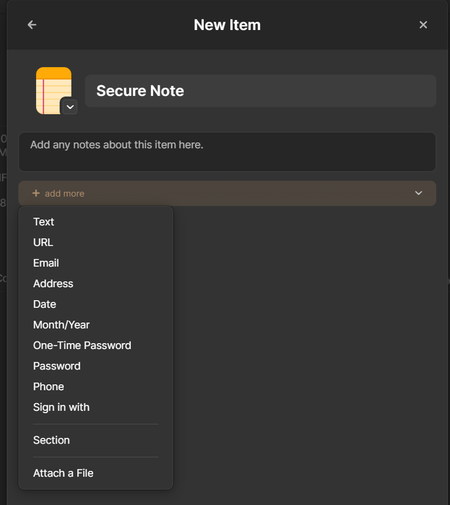
3 years ago"Link to a related item" available only when editing existing item, not when creating a new item.
When I'm creating a new item in any category, I don't get the "Link to a related item" option.
I get that option only while editing any existing item.
Because of this, I have to...
Anonymous
3 years agoHi GreyM1P . I think your analogy is revers of actual situation. I'm creating a new item and trying to link to an existing item from it. That existing item already has an UUID.
For example, I created an item for "Citi Credit Card". 1P assigned it an UUID. Then I'm creating a new item for "Citi Bank Login", and while creating it, I don't get an option of "Link to a related item" and thus can't link the previously created "Citi Credit Card". "Citi Credit Card" already has an UUID at this point and I think I should be able to link to it from this "draft" of "Citi Bank Login".
It's like starting to write a new blog post ("Citi Bank Login" in the example) and adding a hyperlink to other previous existing blog post ("Citi Credit Card" in the example) in it. The blog post I'm currently writing doesn't have a permalink / url, but the previous post I want to link to has. So, I can create that hyperlink. I don't see why that can't happen technically.
It's like trying to make a shortcut to a file on your computer that you haven't yet saved.
But the item I'm trying to link to is already saved. ("Citi Credit Card" in the example)
Hope I was able to explain it properly. :)




