Level up your business security with free, on-demand training and certification. Explore 1Password Academy today →
Forum Discussion

Former Member
4 years agoMenu Bar Icon on 1Password 8
Is it me or is the Menu Bar icon in 8 a step backwards from the functionality in 7? I jumped back to 7 to compared the two so excuse me as I work from memory:
On 7, I can click the lock in the Men...

roustem 1Password Team
4 years ago1Password TeamThank you so much for your feedback, @Mettazoan! It is really helpful.
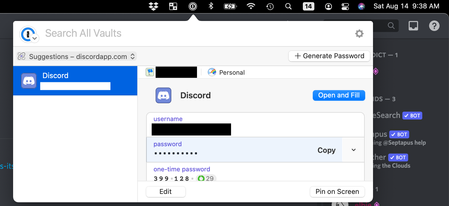
On 8, the lock icon just allows me to launch the full app or to perform a search. Once I launch the full app, I think I recall hitting the Touch ID and nothing happened. I'm guessing I have to click the fingerprint icon first and THEN press Touch ID.
When 1Password main window becomes active we have a choice of triggering the Touch ID prompt or not doing so. When the Touch ID prompt is trigger the control goes to the operating system and macOS shows the modal prompt. Because of that, we try to be careful to not trigger the prompt any time the window becomes active. For example, you would want to hide the window on top of locked 1Password and then suddenly it becomes active and shows the modal prompt. However, in this case, the 1Password is activated explicitly and it seems like a good idea to start Touch ID. I will let our dev team know about this.
only briefly tried the search feature but I'm not sure what the point is. With the way it seemed to search/expose information, I may as well just launch the full app.
We just recently added this feature to the build and I felt the same way in the beginning. At the same time, today I needed the password for my SSH Key when I was in Terminal. I pressed ⌘⇧Space, typed id_ed, then ⌘⇧C, ⌘V and my key was unlocked. It might be just a couple of seconds faster but it felt pretty good.
Another example, is quickly opening an item like a Driver License or Credit Card is a separate window when you do not want to cover the entire screen: ⌘⇧Space, find item, ⌘O (seems like ⌘O shortcut is broken at the moment 😕).




