Level up your business security with free, on-demand training and certification. Explore 1Password Academy today →
Forum Discussion

accordionmelody
2 years agoDedicated Contributor
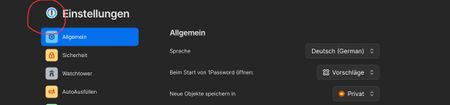
Minor visual issue in 1Password Browser settings page
In the 1Password for Safari Browser settings page, the 1Password icon on the top left is blurry and has a low quality. I do not know, if this is also the case for other browsers.
All other icons on...

accordionmelody
1 year agoDedicated Contributor
When switching from a view (e.g. detailed view of an entry or start page or Watchtower start screen) to a list view (e.g. clicking on a vault) or back, the background filling of the tab bar disappears briefly.
Steps to reproduce:
1) Open 1Password to the objects page
2) Tab into one vault to open the vault to the list view (note there need to be at least 10+ items in a vault, to have a list that is scrollable)
3) You should be able to observe the visual glitch on the tab bar, where the background filling is briefly missing.
This same behavior can also be observed in the following circumstances:
1) Open an item from the list view
2) navigate back from the detail view of an item to the vault (showing all items in the vault in a list) using the “<“ button.
1) Open watchtower
2) Click the button “Overall password strength”
1Password Version: 8.10.34
Extension Version: Not Provided
OS Version: iOS / iPadOS 17.5.1
Browser: Not Provided


