Our community is getting an upgrade on July 2nd! Learn more in the FAQs →
Forum Discussion

KeithHenrickson
20 days agoNew Contributor
Missing add browser button
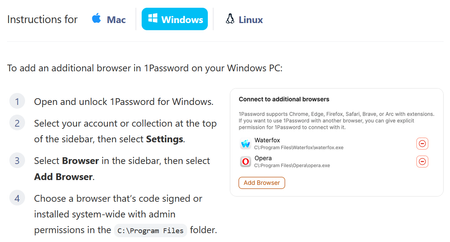
Apparently, to add an unsupported browser, I can click "Add Browser". But there is no "Add Browser" button: The log file goes on an on about "Verifying browser", followed by, "Additiona...
- 13 days ago
Hello folks,
I'm sorry that the "Add Browser" button is missing in the 1Password app for certain users. Thank you to everyone who submitted a diagnostics report. We've been able to reproduce the issue on our end, which doesn't seem to effect everyone, and we've opened a bug report with our development team for further investigation.
In the meantime, you can continue using 1Password in an unsupported browser even if you're affected by this issue. However, you'll need to unlock 1Password in that browser separately from the desktop app using your account password.
I'll share an update in this thread as soon as a fix becomes available or we have more news to share.
-Dave
Issue=DESK-652


derock
17 days agoNew Contributor
I have the Zen browser installed and I would like to add it to 1password. Following the documentation, I have the 1password extension installed in Zen (through the Firefox store). On the 1password app, I navigated: (three dots) -> Settings -> Browser and I see the "Connect to additional browsers" section header, but I don't see the "Add Browser" button.
Running on Windows 11 Pro 25H2 w/ 1Password for Windows 8.12.21 (81221001). I have restarted 1password, fully closing it via task tray and unlocking it once again.

Spacecraft
14 days agoNew Contributor
Same here. Some kind of regression. Anyone know if it still works in an older build?


