Our community is getting an upgrade on July 2nd! Learn more in the FAQs →
Forum Discussion

KeithHenrickson
20 days agoNew Contributor
Missing add browser button
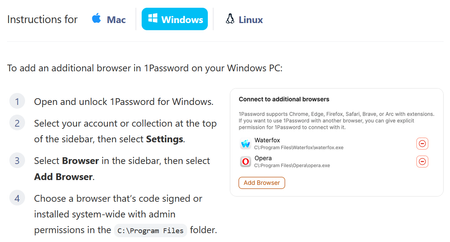
Apparently, to add an unsupported browser, I can click "Add Browser". But there is no "Add Browser" button: The log file goes on an on about "Verifying browser", followed by, "Additiona...
- 13 days ago
Hello folks,
I'm sorry that the "Add Browser" button is missing in the 1Password app for certain users. Thank you to everyone who submitted a diagnostics report. We've been able to reproduce the issue on our end, which doesn't seem to effect everyone, and we've opened a bug report with our development team for further investigation.
In the meantime, you can continue using 1Password in an unsupported browser even if you're affected by this issue. However, you'll need to unlock 1Password in that browser separately from the desktop app using your account password.
I'll share an update in this thread as soon as a fix becomes available or we have more news to share.
-Dave
Issue=DESK-652


Spacecraft
14 days agoNew Contributor
Re-commenting this at the root level of this thread in case anyone missed it.
- Uninstall your 1password
- Delete the 1password folder in: C:\Users\{your username}\AppData\Local
- Install 8.11.22 from https://app-updates.agilebits.com/product_history/OPW8 (may need to ctrl+f to find it)
- Launch 1password. It will tell you it needs to update on next restart. Ignore for now. Go to the browser settings and add zen.
- Test that the extension in zen communicates with the desktop app
- Restart 1password to install the latest update
Your zen exe should still be added and the connection working, but the add browser button will be gone again.
- 1P_Dave13 days ago
Moderator
Thank you for sharing this! I've passed this along to our development team so that they're aware.
Generally, we recommend sticking with the latest version of 1Password whenever possible, since older versions don't include the newest improvements, bug fixes, and security updates, and can sometimes lead to unexpected issues. I'd also be cautious about deleting the app's local cache, especially if the desktop app is the only place you're currently signed in, as doing so could leave you locked out of your account.
That said, I'm glad those steps helped get things working again and provided a workaround for you.
-Dave


