Protect what matters – even after you're gone. Make a plan for your digital legacy today.
Forum Discussion

baikunz
6 months agoNew Contributor
Ongoing Autofill Issues on Android
Hi, I've been a long-time user of 1Password, and up until recently, the experience has been excellent. However, for the past few months, the Android experience has significantly deteriorated. Autof...

1P_SimonH Community Manager
6 months agoCommunity ManagerHi baikunz,
I really appreciate that you've looked into this and tried so many things to solve the problem!
I spoke to the Android team here and there are a couple of possibilities that are most probable:
First, Chrome recently introduced a new setting related to autofill that requires user intervention. You can check this by opening the 1Password app on your phone, selecting Settings from under your user icon, then selecting Autofill. We've updated 1Password to show an alert like you see below if things aren't configured correctly.
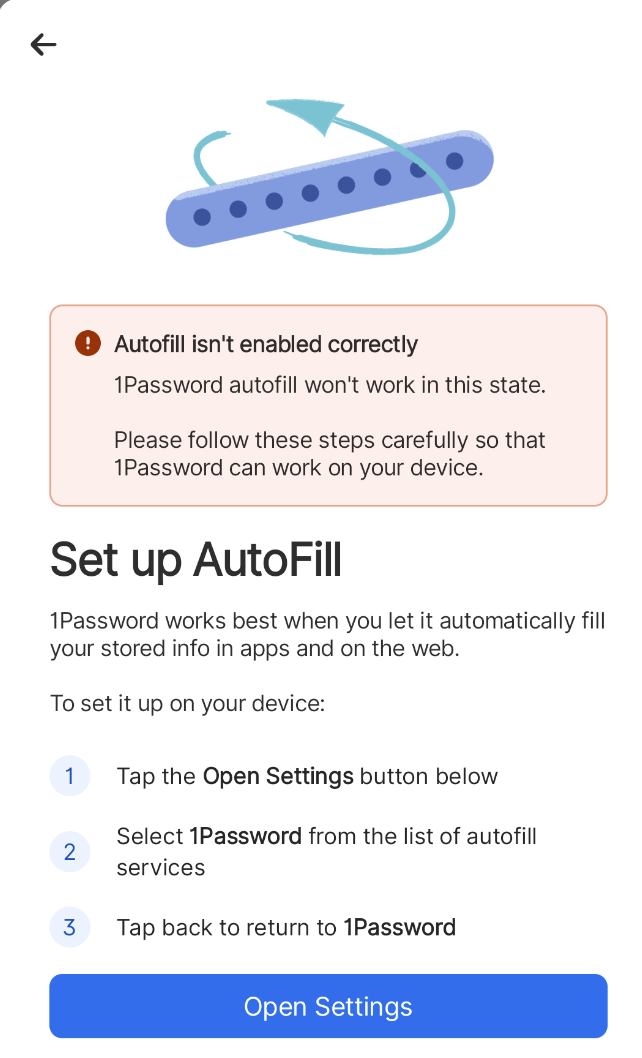
If you don't see any alert on that screen, you're most likely running into a couple of Chromium bugs related to autofill that we're waiting for our friends at Google to fix. I know that's a frustrating answer (a lot of us at 1Password use Chrome on Android, too!), but trust us that we're urging those bugs to be prioritized.
It is possible that something else could be going on, so if you want to do a deeper investigation, please don't hesitate to email us at support@1password.com and we can take a look!

baikunz
6 months agoNew Contributor
Thanks for the quick reply, unfortunately the alert does not show up on my phone, which means everything must be configured correctly.
- 1P_SimonH6 months ago
I'm sorry it wasn't the simplest solution, baikunz. We'll update the Community when the Chrome bugs are fixed – I know we're all eager for that!
 SplatMan_DK9 days agoNew Contributor
More than five months later ...
Pixel 10 Pro Issues | 1Password Community
Simon: you need to get someone on the horn, and get the ball rolling on this. It's getting embarrasing.- sjmoll8 days agoOccasional Contributor
SplatMan the fix has been available for a while. Chrome released it initially behind a setting that you will have to enable.





