Level up your business security with free, on-demand training and certification. Explore 1Password Academy today →
Forum Discussion

kmtharakan
1 year agoNew Contributor
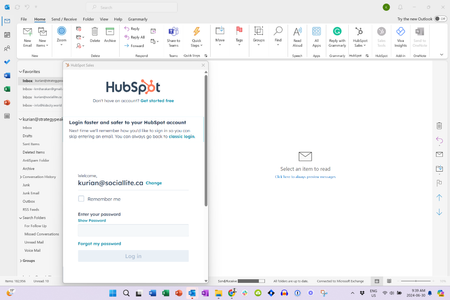
Outlook - 1 Pass not autofilling pop-up window
When I open up my desktop Outlook, I get a pop-up window asking me to log into my Hub Spot CRM. However, 1Pass does not allow me the option to autofill this pop-up.
How do I fix this?
...

1P_Evon 1Password Team
1 year ago1Password TeamHello kmtharakan, thank you for writing in!
Although 1Password can autofill fields while browsing the web, this cannot be done within desktop applications.
That said, filling in applications is easier with https://support.1password.com/quick-access/#fill-details-in-apps. Quick Access lets you find any item you need without leaving the app you're working in.
We are also working on the https://1password.community/discussion/144416/auto-type-for-windows-now-available-in-labs-nightly feature. This new feature is used through Quick Access to fill your credentials in apps. You can https://support.1password.com/labs/#test-new-features by opening the 1Password desktop app and navigating to ( ⋮ ) > Settings > Labs > Auto-type and enabling the Auto-type feature from there.
I hope that helps. Let me know if you have any questions.
-Evon


