Our community is getting an upgrade on July 2nd! Learn more in the FAQs →
Forum Discussion
snoringelephant
7 months agoFrequent Contributor
Passkey CR - Allow 1P To Scan QR Code
There are many times when I am browsing in some browser (like Safari, Edge, etc.) and the site recognizes that one or more passkeys have been created for the site and it pops up a prompt asking fo...
- 7 months ago
Thank you for explaining your use case! The team is currently exploring macOS AutoFill which sounds like it would fit your needs for these edge cases where 1Password in the browser isn't available. With macOS AutoFill, you would see the 1Password desktop app as an option right along with "iPhone, iPad, or Android device" and "Security key" in the prompt in your screenshot.
I'll pass your comments and request to our product team. Thank you for the feedback!
-Dave
PB-51814035

snoringelephant
2 months agoFrequent Contributor
1P_Dave fyi - I am running 1Password 8.12.8 on MacOS Sequoia 15.7.4 and I am running into the same problem still when trying to launch a Microsoft Product (Excel) for the first time.
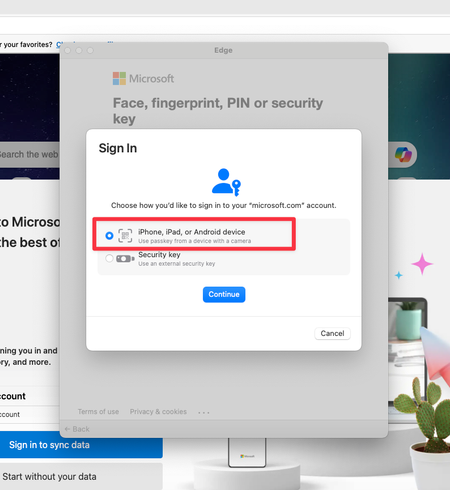
Once again, I am handcuffed by the fact that I am storing my passkeys in 1Password because I do not see what you described as:
the 1Password desktop app as an option right along with "iPhone, iPad, or Android device" and "Security key" in the prompt
I still see the following:
I still believe my original CR would be (dare I say) a better way to handle this scenario. In other words, allow 1Password to scan the QR Code being offered by the above prompt and use it for authentication by selecting a new option to scan the passkey authentication QR Code. I think it could look something like this:
I don't know what the status is for the team:
1P_Dave wrote:exploring macOS AutoFill
1P_Dave - Can you provide an update and also perhaps suggest this as another option?
Thanks.
- 1P_Dave2 months ago
Moderator