REMINDER: the community is in read-only mode until July 2nd. This is part of our platform upgrade! Learn more in the FAQs →
Forum Discussion

ryan_short
1 year agoNew Contributor
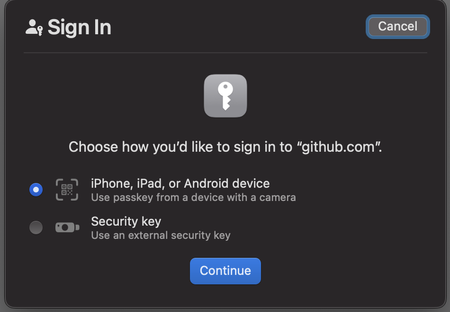
Passkey prompt missing in Firefox
I've currently got a number of passkeys saved in 1password and this works correctly on my iPhone and also in Chrome on Mac. But when attempting to log into the same site on an M2 Mac laptop (I'm test...

1P_Dave Moderator
1 year agoModeratorHello ryan_short! 👋
I'm sorry that you're unable to sign in to Github using a passkey in Firefox. I've just tried signing in using the following steps and I received the passkey prompt from 1Password:
- Go to https://github.com/
- Click Sign In.
- Click Sign in with a passkey.
Are you following the same steps? If you then please check the following:
- Open your browser.
- Right-click on the 1Password icon in your browser's toolbar and click Settings.
- Click General.
- Make sure that "Make 1Password the default password manager in this browser" is turned on.
- Click Autofill & save.
- Make sure that "Offer to save and sign in with passkeys" is turned on.
- Turn off the built-in password manager: Turn off the built-in password manager in your browser
other than deselecting one Vault
Can you double-check that you didn't turn off the vault that contains your passkey for Github? I look forward to hearing from you.
-Dave


