REMINDER: the community is in read-only mode until July 2nd. This is part of our platform upgrade! Learn more in the FAQs →
Forum Discussion

brebre
2 years agoNew Contributor
Password box disappears on marriott.com
Hi 1Password team,
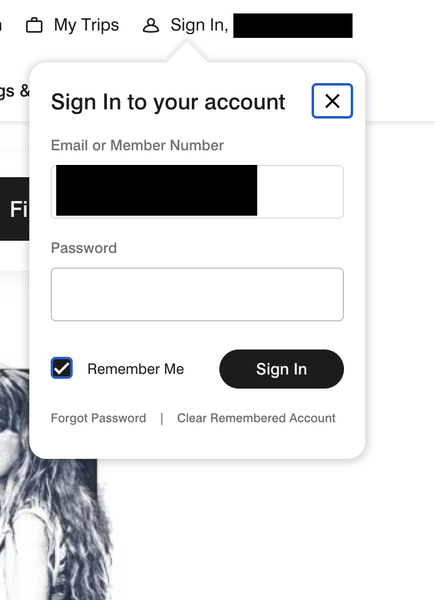
Marriott.com's login page opens a small pop-up widget. When I try to autofill my password from 1P, the box disappears.
Here's a screenshot of what the pop-up widget looks lik...

1P_Dave Moderator
2 years agoModeratorHello brebre! 👋
I'm sorry that Autofill isn't working on Marriott's website. This is a known issue that our development team is investigating, we hope to include a fix in a future update to 1Password.
For now, you can instead click the 1Password icon in your browser's toolbar, make sure your Marriott Login item is selected, and click the "Autofill" button to fill your login.
Thank you for reporting the issue.
-Dave
ref: dev/core/core#14871
 NwAem25256 days agoNew Contributor
I recent had this issue reported by a user this week for Marriott.com . We are on version 8.12.24. Does anyone know if there are still plans to correct this?
- ChrisC1P4 hours ago
Hi NwAem2525 thanks for reaching out!
I'm sorry that one of your users is still running into this issue.
While I don't have any specific updates to share, I can see we still have an internal report open for this issue and so I've added you as an affected user.
In the meantime, the user can fill their login info on the Marriott site with the workaround Dave shared above although I understand that's not ideal.
Let me know if you have any questions.
-Chris
Issue=FILL-1128


