REMINDER: the community is in read-only mode until July 2nd. This is part of our platform upgrade! Learn more in the FAQs →
Forum Discussion

4EverMaAT
4 years agoOccasional Contributor
password options not showing in browser pop-over frame....
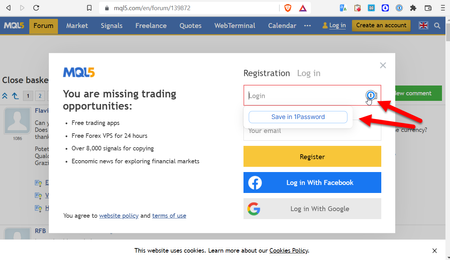
So 1P was locked. and I visited https://www.mql5.com/en/forum/139872 which did a pop-up prompting me to login. I already have a login for this site, but 1P icon in the username/password fields only ...
4EverMaAT
4 years agoOccasional Contributor
Ok. @ag_ana
I was able to reproduce it. But on a different page of the same site. You can go to any indicator or EA and attempt to download the code. if you are not logged in, it will prompt you to login. For example:
https://www.mql5.com/en/code/37523
you won't be logged in. Just click on the xxxxx.mq4 file link and and it will bring up the login popover.
so 1p does not have any available passwords here.
but the main 1p extension icon shows the already saved passwords for the mql5.com website
maybe the box is pointing to a different url, so it's not showing up?? again, I don't know.
mp4 is not allowed here for some reason (less than 0.5MB). So dropbox demo is here
https://www.dropbox.com/s/gng1obry56f9i9s/1P-X%20not%20showing%20password%20mql4%20popover%20window.mp4?dl=0
Edit: the extension icon-based login in the final screenshot points to
https://www.mql5.com/en/auth_login
if that helps. This is different than the popover. But with other sites that have a popover type of login alternative, there is no issue.


