REMINDER: the community is in read-only mode until July 2nd. This is part of our platform upgrade! Learn more in the FAQs →
Forum Discussion

mtissington
4 years agoFrequent Contributor
really confused and messed up shortcuts
I am running 8.5.83 on Mac Desktop
Firefox extension is 2.2.4
I would like a single shortcut to unlock and auto fill without being prompted with a list of possibilities.
The list always seems ...

Jack_P_1P 1Password Team
4 years ago1Password TeamHey mtissington:
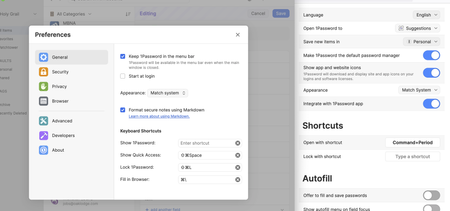
It looks like 1Password in your browser is not set to allow filling and saving. In the screenshot you've provided enable these two settings I've marked with arrows:
After enabling those two settings, using your Fill in Browser shortcut configured in 1Password 8 for Mac as Nhat mentioned should work as expected. Pressing Cmd+\ if you have only a single Login item for the website you are on will automatically fill the username and password, and if you have multiple Login items, it will open the in-line menu with your list of Logins.
Let me know how you get on with that!
Jack


