Level up your business security with free, on-demand training and certification. Explore 1Password Academy today →
Forum Discussion

prime
1 year agoSuper Contributor
Request: Turn off username guessing in the apps [RESOLVED]
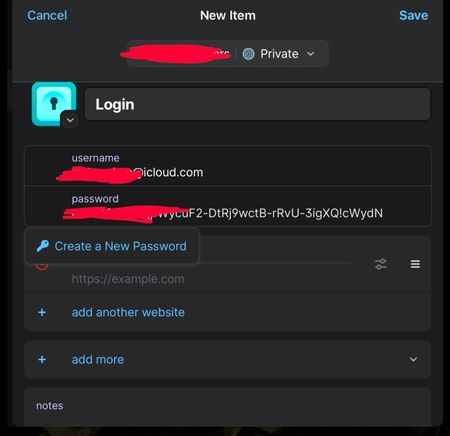
When I go to create a new login, the user name is prefilled with an email address I haven’t used in years. This shouldn’t have any email address, especially when I use Fastmail’s masked emails. I hop...
- 11 months ago
Hello everyone,
I'm happy to share that, with the latest update to the stable version of 1Password (8.10.78), our team has added a setting to turn off the prefilling of usernames when creating new items in the app:
You can find instructions on how to update here: How to keep 1Password up to date
Thanks again for all of the feedback and for always helping us make 1Password more useful for your needs and your workflows.
-Dave

prime
1 year agoSuper Contributor
Username suggestions are based on the vault that you’re creating a new item in. Is it possible that the vault that you're creating the item in has login items that use that old email address?
I found 1 out of 357 items. I also just moved it to the archive.
The team is considering a few different options to better accommodate different use cases, including Fastmail integration and I'm happy to pass along your feedback.
Thank youOut of curiosity, would having 1Password automatically generate a new Fastmail masked email alias in the username field be something that you'd find useful?
No, because I make up my own aliases and have fun. For instance; for Subway I can have footlong@mydomain.com, Costco I have bigstore@mydomain.com, and so on. Since I got my domain, I rarely use the Masked Emails anymore.
Or do you just prefer an option to turn the automatic suggestion off entirely?
Yes, I would like an option to turn it off. There are some features I don’t use, but as long as it’s not in my way, I don’t care. This one is definitely in my way.


