Our community is getting an upgrade on July 2nd! Learn more in the FAQs →
Forum Discussion

sfwalter
6 months agoNew Contributor
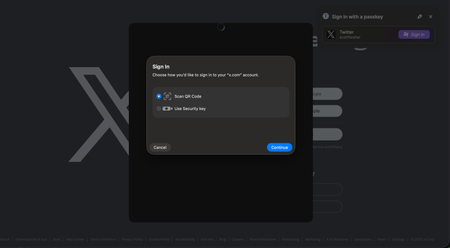
Safari: "Scan QR Code" or "Use Security key" prompt when using a passkey
Hi,
I setup my very first passkey using X.com. When I attempt to login I get this dialog with options to scan a QR code or use a security key. The sign in with pass key option in the upper right ...
- 6 months ago
Hello folks,
I'm sorry that you're seeing an unexpected "Sign In" prompt from macOS when signing into websites using a passkey saved in 1Password in Safari. If you think that you're running into this issue then make sure that 1Password for Safari is installed and the built-in password manager is turned off.
If that doesn't help then there is a known issue, that our development team is aware of, where the macOS credential manager prompt will appear randomly and unexpectedly on certain websites in Safari for a small number of users. Our team is aware of the issue and an internal work item is open to investigate this further.
For the time being, the best workarounds are:
- Sign-in using an alternate method if you can, such as your password.
- Sign-in using 1Password on your mobile device by choosing the "Scan QR code" option in the prompt and then scanning the QR code using your mobile device's camera app.
- Consider using a different browser for the affected website, the issue only seems to occur in Safari.
I'm sorry for the inconvenience, hopefully this can be fixed in a future update soon.-Dave
Issue=FS-1011

1P_Dave Moderator
6 months agoModeratorHello sfwalter! 👋
I'm sorry that you're running into issues when signing in using a passkey in Safari. I suspect that you're running into an issue that our development team is currently investigating. So that I can confirm this, I'd like to ask you to reproduce the issue again and then create and share a 1Password diagnostics report from 1Password in your browser:
Send a diagnostics report (browser extension)
Attach the diagnostics to an email message addressed to support@1password.com
With your email please include:
- A link to this thread: https://www.1password.community/discussions/1password/dialog-pops-up-preventing-me-from-using-passkey/164838
- Your forum username: sfwalter
You should receive an automated reply from our BitBot assistant with a Support ID number. Please post that number here. Thanks very much!
-Dave
Issue=FS-1011