Our community is getting an upgrade on July 2nd! Learn more in the FAQs →
Forum Discussion

sfwalter
6 months agoNew Contributor
Safari: "Scan QR Code" or "Use Security key" prompt when using a passkey
Hi,
I setup my very first passkey using X.com. When I attempt to login I get this dialog with options to scan a QR code or use a security key. The sign in with pass key option in the upper right ...
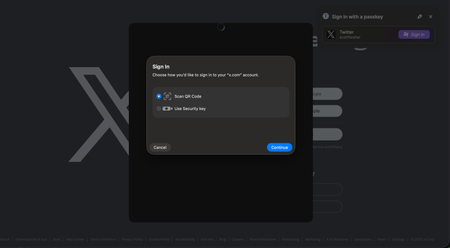
- 6 months ago
Hello folks,
I'm sorry that you're seeing an unexpected "Sign In" prompt from macOS when signing into websites using a passkey saved in 1Password in Safari. If you think that you're running into this issue then make sure that 1Password for Safari is installed and the built-in password manager is turned off.
If that doesn't help then there is a known issue, that our development team is aware of, where the macOS credential manager prompt will appear randomly and unexpectedly on certain websites in Safari for a small number of users. Our team is aware of the issue and an internal work item is open to investigate this further.
For the time being, the best workarounds are:
- Sign-in using an alternate method if you can, such as your password.
- Sign-in using 1Password on your mobile device by choosing the "Scan QR code" option in the prompt and then scanning the QR code using your mobile device's camera app.
- Consider using a different browser for the affected website, the issue only seems to occur in Safari.
I'm sorry for the inconvenience, hopefully this can be fixed in a future update soon.-Dave
Issue=FS-1011


CarOli
6 months agoOccasional Contributor
Although some minor deviations from the main line are mentioned, the core problem still persists: a lot of Passkeys enabled web sites, not only Synology Burt Google/YouTube and many others as well, are victim of this (really annoying) problem. 1 or 2 seconds after you hit a Passkeys enable web site and the 1Password extension in browser (here macOS 26.x, Safari, 1P 8.1..20, Safari Extension 8.11.18.36) pops up the system pops up another box in the foreground (use hardware key or scan QR code).
This still happens after following all 1Password recommendations: turning off Autofill and https://support.1password.com/disable-browser-password-manager/?mac
Can you please provide your community an update for this problem, which already appeared over a year ago as you can read from this site or reddit.
- 1P_Dave6 months ago
Moderator
I'm sorry that you're also running into this issue. If 1Password for Safari is installed, and you've turned off the built-in password manager, then I can confirm that you're running into a known issue that our team is aware of. I don't have any updates to share at this time and I've added you to the internal work item for the issue. Please see my post here for workarounds that might help in the meantime.
-Dave