Protect what matters – even after you're gone. Make a plan for your digital legacy today.
Forum Discussion

Lesbo
7 months agoNew Contributor
Slow Response on 1Password M4 Mac
Hello,
I was running 1Password for Mac 8.11.2 (81102021) on my i9 MacBook Pro 2019.
Since Upgrading to my Macbook Pro 14" M4 Apple Silicon Same version of Sequoia 15.5 it has been very slow to open and retrieve my information.
I have done a check for updates and nothing new comes down for 1Password.
I have noted a few other posts one said it fixed itself, others the moderator asks is they using the Apple Silicon Version?
Do I need to Remove the Current version and Install again from scratch?
Hi Lesbo,
You're exactly right that 1Password should have updated itself to the Apple silicon version. Could you please do a quick check to see if it is the issue of running the Intel version?
To find this, open your Applications folder, right click on 1Password, then select Get Info. In the Kind field, it'll say "Apple silicon" if you're running that version.
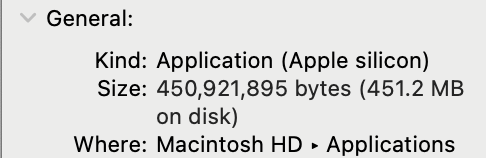
If you discover you're running the Intel version and need help switching, just let me know!

2 Replies
 LesboNew Contributor
Hi,
Thanks for the response, I suspected this may have been the case, I should have tried it first.
I deleted 1Password, downloaded, and installed again now it is the Apple Silicon Version now, it is now a lot faster.- 1P_SimonH
Community Manager
Hi Lesbo,
You're exactly right that 1Password should have updated itself to the Apple silicon version. Could you please do a quick check to see if it is the issue of running the Intel version?
To find this, open your Applications folder, right click on 1Password, then select Get Info. In the Kind field, it'll say "Apple silicon" if you're running that version.
If you discover you're running the Intel version and need help switching, just let me know!





