Level up your business security with free, on-demand training and certification. Explore 1Password Academy today →
Forum Discussion
Tyrone2
3 months agoOccasional Contributor
System Restore Affected 1Password on Win11
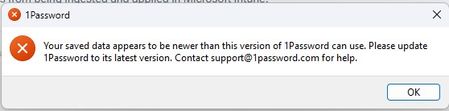
1Password generated an error message after a system restore on a custom build PC with a clean install of Windows 11. Options were to repair, uninstall or contact support. I've done the first 2. A...
 3 months ago
Hi Tyrone2, I'm glad to hear that 1Password is working normally after undoing the system restore.
The newer version error you were seeing is because you were previously running a Nightly build, and then reinstalled the Production version. Nightly builds can introduce newer database formats that older releases can't open.
If this happens again in future, the safest option is to reinstall the same channel you were using before. To get this version directly, edit the usual download link to add .NIGHTLY before .msixbundle.
Alternatively, you can reset the local 1Password database and sign back in, which will get the Production version working. Since this process can result in loss of data if the proper precautions aren't taken, if you'd ever like to take this route, email in to support@1password.com and our support team will be happy to walk you through it.
If you have any further questions, let me know!
- Gem
Tyrone2
3 months agoOccasional Contributor
Progress on this issue: I did a system restore "Undo" which solved my problems with 1Password. I'm on the nightly channel and I see that the version is 8.12.4.
The only remaining question for future reference is where do I find the most current version if this ever happens again?
Thanks.
1P_Gem Moderator
3 months agoModeratorHi Tyrone2, I'm glad to hear that 1Password is working normally after undoing the system restore.
The newer version error you were seeing is because you were previously running a Nightly build, and then reinstalled the Production version. Nightly builds can introduce newer database formats that older releases can't open.
If this happens again in future, the safest option is to reinstall the same channel you were using before. To get this version directly, edit the usual download link to add .NIGHTLY before .msixbundle.
Alternatively, you can reset the local 1Password database and sign back in, which will get the Production version working. Since this process can result in loss of data if the proper precautions aren't taken, if you'd ever like to take this route, email in to support@1password.com and our support team will be happy to walk you through it.
If you have any further questions, let me know!
- Gem