REMINDER: the community will be in read-only mode from tomorrow until July 2nd. This is part of our platform upgrade! Learn more in the FAQs →
Forum Discussion

Anonymous
3 years agoTouch ID option disabled after Mac restored from Time Machine
I recently had the logic board replaced in my MacBook Pro. I restored the Mac from a Time Machine backup that was roughly 6 days old. When I launched 1P, I got the message stating a I'd used a newer version. I followed the instructions https://1password.community/discussion/129049/warning-popup-on-launch to resolve the issue.
After setting up TouchID, I rebooted a few times and after each reboot, the option to enable TouchID in 1P remains disabled.
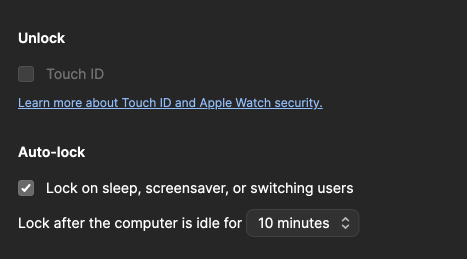
I've tried numerous reboots, toggling all the TouchID settings on/off, but nothing seems to take.
Suggestions? Thank you!
1Password Version: 8.10.4
Extension Version: 2.10.0
OS Version: 13.3.1
Browser:_ Chrome
4 Replies
- 1P_Dave
Moderator
I'm happy that you were able to figure things out. 🙂
-Dave
- Anonymous
I was looking through some of the other posts in the forum that mentioned biometrics and the "EnrollmentChanged" log entry. I had the same entry in my log file and had to recreate my fingerprints for TouchID (my previous fingerprints didn't show up after the restore). I'm guessing that is what was causing the EnrollmentChanged log entry and preventing 1P from allowing TouchID to be enabled. Cheers!
- 1P_Tommy
Sounds good @4nthony If you have any other questions please let us know. My best guess would be that the restore did not bring over something that was needed. We would need a diagnostics report to look deeper. With you having replaced the installation that would not be possible now. I am glad that you were able to get going again.
- Anonymous
I completely removed 1P from the machine, rebooted, reinstalled, and TouchID is back.


