Level up your business security with free, on-demand training and certification. Explore 1Password Academy today →
Forum Discussion

parekh
3 years agoOccasional Contributor
Unable to auto-fill generated passwords
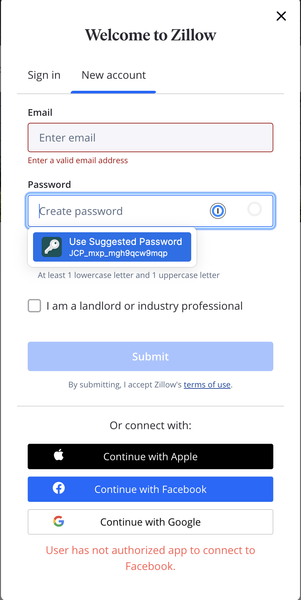
When a form asks me to "create password" I can see the 1Password dropdown with a suggested password, but clicking that item does nothing (see screenshot 1).
If I go into the Chrome extension and ...

Anonymous
3 years agoSame problem here: Chrome, Windows 10 and "Unable to save generated password".
Have followed the whole detailed process outlined by paul.m_1p above and the "fix" does not stick for very long. Travel mode is off.
So, back to pasting 1password generated passwords from one UI into notepad and then manually pasting them back into a different 1password UI. After entering my very long master password, of course. (I'm beginning to understand the joke circulating about why it's called 1password- I will be typing that one long password many, many times.)
I just migrated over from LastPass last month and am seriously regretting that I actually paid for this product. A password manager that can't reliably generate and save passwords in a common browser is about one half of an MVP to me. While the product may be secure, the UX is simply not ready for prime time.
Oh. By the way, this is not an "making an improvement". It's known as "fixing a bug".
It's a really simple use case: "As a user, while using Chrome on Windows, I want to be able to generate a new secure password and save it."
Others apparently can do it. If you are simply understaffed or don't have the technical capabilities, please let me know. I can always spin up a Docker container with Bitwarden and migrate all of my family over to another system. Right now it would be a lot less ongoing effort for me.


