Level up your business security with free, on-demand training and certification. Explore 1Password Academy today →
Forum Discussion

Former Member
3 years agoUnable to set Fill in Browser shortcut as cmd+\
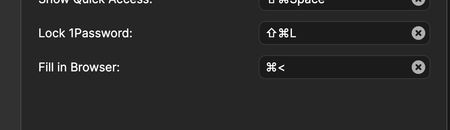
Hello, just upgraded to version 8 of 1password and I am unable to use the shortcut cmd+\ to fill-up form on the web. Clicking cmd+\ doesn't do anything. I checked on the preferences and changed it to...
Former Member
3 years agoCan confirm the problem is absolutely NOT fixed. It's not that autofill doesn't work, the problem is that you can't set the autofill shortcut to cmd+\, because on certain keyboard layouts (like the Italian one) it gets assigned to cmd+< when you try to do that. It's just impossible to use cmd+\ as the autofill shortcut, which is the default one users are told to press when they want to autofill, and people will try to press it and it won't work, because it's bugged on certain keyboard layouts. Option A would be to fix this bug and make cmd+\ work on every keyboard layout. If that's not possible right now, option B would be to set the default autofill shortcut to a different one for specific layouts that are known not to work with cmd+\ and make sure users know the new shortcut they should use instead, so that they will have a working shortcut out of the box, without needing to change anything in the preferences.


