Level up your business security with free, on-demand training and certification. Explore 1Password Academy today →
betas
2199 Topics
#ME-271 feedback: Inline menu hidden in Safari on iOS when system AutoFill is enabled
Hello, I recently noticed that a lot of login forms were no longer showing the 1Password drop-down to select a credential. I believe it is related to this change referenced in the title. Simply put, I prefer the browser extension to select credentials for logging in. It handles OTP codes faster and easier than the system autofill in iOS/iPadOS. Instead, using the system autofill requires extra taps, needlessly populates the clipboard with OTP codes, and generates notifications about the OTP being copied to the clipboard that I'm frequently needing to dismiss. I'm not sure if this is something that can be made optional in the browser extension settings, but I strongly dislike this new behavior and hope that it will be reverted to the previous behavior, or at least made optional. Thank you.Solved2.9KViews8likes71Comments
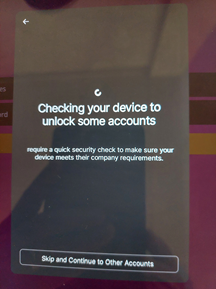
Checking your device to unlock some accounts
Is this from 1password? It was a new popup when I use autofill on my Samsung Tab S7. It does not go away after a while. The skip button does not word. Only go back helps. Then the autofill works normal. I use the latest Android beta 8.11.6. Also see Reddit: https://www.reddit.com/r/1Password/comments/1mmpqjd/device_check_when_selecting_password/Solved531Views4likes5CommentsBeta Release: New MSIX Installer for 1Password for Windows
Hello 1Password Community! We are excited to announce the beta launch of the MSIX installer for 1Password for Windows. The MSIX installer combines the benefits of our existing EXE and MSI installers, meaning that you no longer need to compromise between features that are exclusive to the EXE or MSI. Like MSI installations, MSIX installs to a directory that requires admin privileges to modify, providing additional tamper-proofing measures. In addition to this, MSIX offers an improved ability to detect other common forms of tampering, notifying the user and giving them the option to repair or reset the install. EXE MSI MSIX Protected install* ❌ ✅ ✅ Improved tamper detection ❌ ❌ ✅ ARM64 support ✅ ❌ ✅ In-app updates ✅ ✅ ✅ Access to Beta and Nightly channels ✅ ✅ ✅ *Protected install refers to installing in a directory requiring admin privileges to modify, providing additional tamper-proofing measures against threats such as local malware. Accessing the Beta: We’d love for you to try out the MSIX beta and provide feedback about your experience. To try out the beta, first make sure that you are running Windows 10 20H1 or later. Then, download the installer by clicking on this link and install 1Password. Additional Notes: When will the MSIX be officially released? We are looking to officially launch MSIX in late-June of this year, both as a direct download from our website and via the Microsoft Store. Do I need to uninstall 1Password before installing the MSIX version? It’s recommended but not required. Once the MSIX is installed, you’ll no longer be able to open other versions of 1Password and will be prompted to uninstall old versions, if opened. Can I use the MSIX beta long-term? Yes! Over the course of the beta, you’ll be locked to the beta channel, but once the MSIX is officially released, you will be able to switch to Stable and Nightly channels upon updating. Where can I learn more about MSIX? Check out this Microsoft article on MSIX to learn more. Where can I ask questions and/or provide feedback about the MSIX installer? Feel free to ask your questions and/or provide feedback directly in this thread.Solved17KViews4likes47CommentsAppreciation for the "Items with Duplicates" feature
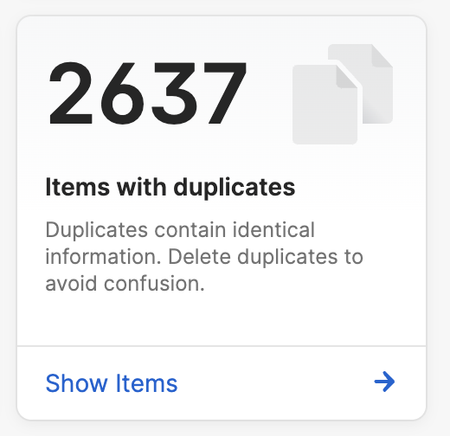
This has been https://1password.community/discussion/comment/697252, and I just wanted to show you the magnitude of the impact this will have on my 1Password experience: 1Password Version: 1Password for Mac 8.10.18 (81018040) Extension Version: Not Provided OS Version: macOS Sonoma 14.0 Browser: Arc 1.13229Views4likes3CommentsExperiment #7 - Anti-Peek Mode
Hello 1Password Community! At 1Password, we are constantly looking for new and innovative ways to help you use 1Password with confidence - even when you are out in the world and uncertain of how secure your surroundings are. This is why we’ve introduced Anti-Peek Mode, a new 1Password Labs feature for our Android and iOS applications that provides additional protection from unwanted shoulder surfing when using 1Password in unsecured, public environments. How does it work? When you enable Anti-Peek Mode in the 1Password app on your Android or iOS device, the following protections are applied making it harder for those around you to peek at your data: Items on the Home screen are blurred and require a long press to reveal Usernames, in addition to passwords, are also concealed by default on item detail screens and must be revealed to see Usernames are no longer displayed as subtitles for items on the Home or Search screens Quick actions when tapping on an item field are disabled and any actions (such as Reveal) must be invoked via the item’s overflow menu Recent search results are hidden. The “Always show passwords and full credit card numbers” option is disabled. Screenshots and screen recording are disabled (Android only) How to try Anti-Peek Mode To try out Anti-Peek mode, first, make sure that you are on the latest version of 1Password (8.10.62) on your iOS or Android device. Then, go to Settings > Labs > Anti-Peek Mode and simply enable the feature. We would love to hear what you think of Anti-Peek Mode as we work to make this feature even better! Once you’ve had a chance to try it out, make sure to share your feedback via this survey or by simply posting a comment below. 📣This feature will only be available in Labs until May 31, 2025 so try it out today!2KViews3likes17CommentsWe're the team behind 1Password’s latest product enhancements. Ask us anything! (Wednesday, February 12th)
Hey everyone! 👋 We're the team behind 1Password’s latest product enhancements. Ask us anything! We’ll be hosting an AMA right here on February 12th at 9AM PT / 12AM ET with 1P_MattG - 1Password’s Senior Director of Product, End User Experience. This round of product enhancements includes exciting updates like a smoother mobile experience, better item creation and navigation, new ways to stay secure, and much more. Starting today, you can RSVP to the AMA and drop your questions here in this thread, and then we’ll answer them live during the AMA on February 12th at 9AM PT / 12PM ET! We can’t wait to chat with you and kick off our first AMA in the new 1Password Community! Check out our blog to find out more about our new and improved features. EDIT: The AMA has now officially concluded. Thank you to everyone for taking the time to chat with us! If you have any follow-up questions or feedback, feel free to drop them here. This thread will remain open until February 14th, 2025, at 5:00 PM ET, so you still have time to continue the discussion. Thanks again for making our first AMA in the 1Password Community a great one! 💙 Our AMA Host Matt Grimes Senior Director of Product, End User Experience, 1Password938Views3likes29Comments
Browser Beta: Feedback regarding the new sign-in experience
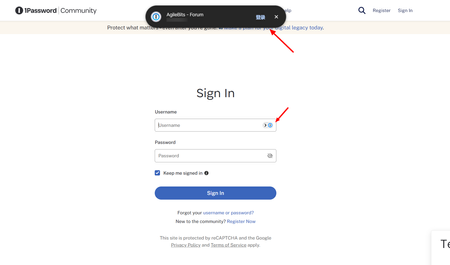
So I was suddenly being upgraded to this new experience today, however, it does not seems to be appearing on the https://releases.1password.com/b5x/beta/#changelog. I guess making the login selection up above resolves one very specific issue - sometimes it can annoying to have 1P prompting under a text box, especially when filling in forms. But I don't think this new design is the answer. Main issue - Long mouse travel - Instead of just flicking my mouse to choose my account, I now have to move my mouse all the way top to click it, which is never a trade off I would take to fix the "filling in the form" issue. Secondly, it was not visually better to have a much larger pop up blocking my web view whenever I am logging in.Solved500Views2likes21Comments1Password no longer starts minimised
Good day, since a few days ago my 1Password (which I've been using for years) no longer starts minimised at system startup. Instead I get a big fat prompt to unlock it every time Windows (Windows 10 Pro 22H2) starts. Thus, utterly annoyed, I've raised a ticket to support (EDU-91977-815), and I've been promptly informed that this is related to the migration to the MSIX installer and the deprecation of the EXE installer (which I've been using until now, apparently). "Windows 10 doesn't appear to support launching MSIX applications in a minimized or background state. I'm sorry for any inconvenience this behaviour causes." The suggested fix was disabling startup, which to me seems preposterous. As a paying customer, I'd much rather the program goes back to how it was before it got broken. This (startup minimised) is a basic functionality of countless programs, and it got broken. If MSIX is such a silly format that it can't start minimised, just keep the EXE going along with it, at least until MS comes up with a fix. Thank you for your time. PS: Until this is fixed, seems I'll have to downgrade to 1Password 8.11.16 / exe format and disable automatic updates. https://downloads.1password.com/win/1PasswordSetup-latest.exe144Views2likes1Comment
Snippets enhancement requests
Hello! I just discovered the Secure Snippets lab, and while I am very excited about this feature, there are a couple of enhancements that could help bridge the gap between this feature and my current text expansion solution: Fields within snippets With my current app, I can add fields into snippets that I can customize each time I use the snippet. For an easy example, I can have the following: Shortcut: !greeting Snippet: "Hello, [name]! I hope you're doing well today!" When I type !greeting, a little box will pop up with a text box for me to type the [name] field. This is especially helpful for longer snippets where I might have multiple such fields that I'd like to customize each time I use the snippet. Embedded Snippets This one is fairly self-explanatory. There are some instances where I want one snippet that contains the text of multiple other snippets. Rather than type them all separately, being able to type one shortcut is really convenient. It also helps if I want to change part of the text, as I can change the specific snippet in question rather than having to change the same thing in multiple snippets. Happy to expand upon or clarify any of the above if it helps improve the feature request!240Views2likes1Comment