Protect what matters – even after you're gone. Make a plan for your digital legacy today.
betas
2185 TopicsLatest beta doesn't show in app tray
The latest 1Password beta appears to have an error on launch and won't show in the system tray in Linux. All previous betas did not have this issue and the current release version also doesn't have this issue so it appears to be a regression. Version: 1password-beta-8.11.16_30 Console output when launching 1Password: INFO 2025-10-16T07:09:49.078+00:00 ThreadId(34) [1P:op-settings/src/store/json_store.rs:75] Settings file created @ 2024-10-23 19:22:28.731374786 UTC and last modified @ 2025-10-16 07:04:03.841979318 UTC INFO 2025-10-16T07:09:49.079+00:00 ThreadId(34) [client:typescript] Client starting. INFO 2025-10-16T07:09:49.137+00:00 ThreadId(34) [1P:op-localization/src/lib.rs:239] system locale detected as 'en-US' INFO 2025-10-16T07:09:49.137+00:00 ThreadId(34) [1P:op-localization/src/lib.rs:265] selected translations for EN_US based on detected locale en-US INFO 2025-10-16T07:09:49.137+00:00 ThreadId(34) [status:app/op-app/src/app.rs:1030] App::new(1Password for Linux/81116030 (EN_US), /home/<redacted-username>/.config/1Password) INFO 2025-10-16T07:09:49.139+00:00 ThreadId(34) [1P:data/op-db/src/common/mod.rs:186] Core DB Integrity Check Succeeded INFO 2025-10-16T07:09:49.139+00:00 ThreadId(34) [1P:data/op-db/src/core_db/db.rs:145] Starting Core DB at version: 46 INFO 2025-10-16T07:09:49.139+00:00 ThreadId(34) [1P:data/op-db/src/common/mod.rs:155] Core DB Table Integrity Check Succeeded INFO 2025-10-16T07:09:49.146+00:00 ThreadId(34) [1P:data/op-db/src/common/mod.rs:186] Resources DB Integrity Check Succeeded INFO 2025-10-16T07:09:49.146+00:00 ThreadId(34) [1P:data/op-db/src/common/mod.rs:155] Resources DB Table Integrity Check Succeeded INFO 2025-10-16T07:09:49.146+00:00 ThreadId(34) [1P:data/op-db/src/resources_db/db.rs:110] Starting Resources DB at version: 1 INFO 2025-10-16T07:09:49.146+00:00 ThreadId(34) [1P:ssh/op-ssh-config/src/lib.rs:380] agent not configured INFO 2025-10-16T07:09:49.149+00:00 ThreadId(34) [1P:native-messaging/op-nm-installer/src/nix_utils.rs:68] Created NMH manifest at /home/<redacted-username>/.config/google-chrome/NativeMessagingHosts/com.1password.1password.json INFO 2025-10-16T07:09:49.149+00:00 ThreadId(34) [1P:native-messaging/op-nm-installer/src/nix_utils.rs:68] Created NMH manifest at /home/<redacted-username>/.config/google-chrome-beta/NativeMessagingHosts/com.1password.1password.json INFO 2025-10-16T07:09:49.149+00:00 ThreadId(34) [1P:native-messaging/op-nm-installer/src/nix_utils.rs:68] Created NMH manifest at /home/<redacted-username>/.config/google-chrome-unstable/NativeMessagingHosts/com.1password.1password.json INFO 2025-10-16T07:09:49.149+00:00 ThreadId(34) [1P:native-messaging/op-nm-installer/src/nix_utils.rs:68] Created NMH manifest at /home/<redacted-username>/.config/chromium/NativeMessagingHosts/com.1password.1password.json INFO 2025-10-16T07:09:49.149+00:00 ThreadId(34) [1P:native-messaging/op-nm-installer/src/nix_utils.rs:68] Created NMH manifest at /home/<redacted-username>/.config/microsoft-edge-dev/NativeMessagingHosts/com.1password.1password.json INFO 2025-10-16T07:09:49.149+00:00 ThreadId(34) [1P:native-messaging/op-nm-installer/src/nix_utils.rs:68] Created NMH manifest at /home/<redacted-username>/.config/BraveSoftware/Brave-Browser/NativeMessagingHosts/com.1password.1password.json INFO 2025-10-16T07:09:49.149+00:00 ThreadId(34) [1P:native-messaging/op-nm-installer/src/nix_utils.rs:68] Created NMH manifest at /home/<redacted-username>/.config/vivaldi/NativeMessagingHosts/com.1password.1password.json INFO 2025-10-16T07:09:49.149+00:00 ThreadId(34) [1P:native-messaging/op-nm-installer/src/nix_utils.rs:68] Created NMH manifest at /home/<redacted-username>/.config/vivaldi-snapshot/NativeMessagingHosts/com.1password.1password.json INFO 2025-10-16T07:09:49.149+00:00 ThreadId(34) [1P:native-messaging/op-nm-installer/src/nix_utils.rs:68] Created NMH manifest at /home/<redacted-username>/.mozilla/native-messaging-hosts/com.1password.1password.json INFO 2025-10-16T07:09:49.149+00:00 ThreadId(34) [1P:native-messaging/op-nm-installer/src/nix_utils.rs:83] Successfully installed all native messaging manifests. INFO 2025-10-16T07:09:49.149+00:00 runtime-worker(ThreadId(31)) [1P:op-global-shortcuts/src/node.rs:38] Global shortcut registration is not available on this system. INFO 2025-10-16T07:09:49.149+00:00 runtime-worker(ThreadId(25)) [1P:op-global-shortcuts/src/node.rs:38] Global shortcut registration is not available on this system. INFO 2025-10-16T07:09:49.149+00:00 runtime-worker(ThreadId(24)) [1P:native-messaging/op-nm-installer/src/nix_utils.rs:68] Created NMH manifest at /home/<redacted-username>/.config/google-chrome/NativeMessagingHosts/com.1password.1password.json INFO 2025-10-16T07:09:49.149+00:00 runtime-worker(ThreadId(24)) [1P:native-messaging/op-nm-installer/src/nix_utils.rs:68] Created NMH manifest at /home/<redacted-username>/.config/google-chrome-beta/NativeMessagingHosts/com.1password.1password.json INFO 2025-10-16T07:09:49.149+00:00 runtime-worker(ThreadId(24)) [1P:native-messaging/op-nm-installer/src/nix_utils.rs:68] Created NMH manifest at /home/<redacted-username>/.config/google-chrome-unstable/NativeMessagingHosts/com.1password.1password.json INFO 2025-10-16T07:09:49.149+00:00 runtime-worker(ThreadId(24)) [1P:native-messaging/op-nm-installer/src/nix_utils.rs:68] Created NMH manifest at /home/<redacted-username>/.config/chromium/NativeMessagingHosts/com.1password.1password.json INFO 2025-10-16T07:09:49.149+00:00 runtime-worker(ThreadId(24)) [1P:native-messaging/op-nm-installer/src/nix_utils.rs:68] Created NMH manifest at /home/<redacted-username>/.config/microsoft-edge-dev/NativeMessagingHosts/com.1password.1password.json INFO 2025-10-16T07:09:49.149+00:00 runtime-worker(ThreadId(24)) [1P:native-messaging/op-nm-installer/src/nix_utils.rs:68] Created NMH manifest at /home/<redacted-username>/.config/BraveSoftware/Brave-Browser/NativeMessagingHosts/com.1password.1password.json INFO 2025-10-16T07:09:49.149+00:00 runtime-worker(ThreadId(24)) [1P:native-messaging/op-nm-installer/src/nix_utils.rs:68] Created NMH manifest at /home/<redacted-username>/.config/vivaldi/NativeMessagingHosts/com.1password.1password.json INFO 2025-10-16T07:09:49.149+00:00 runtime-worker(ThreadId(24)) [1P:native-messaging/op-nm-installer/src/nix_utils.rs:68] Created NMH manifest at /home/<redacted-username>/.config/vivaldi-snapshot/NativeMessagingHosts/com.1password.1password.json INFO 2025-10-16T07:09:49.149+00:00 runtime-worker(ThreadId(24)) [1P:native-messaging/op-nm-installer/src/nix_utils.rs:68] Created NMH manifest at /home/<redacted-username>/.mozilla/native-messaging-hosts/com.1password.1password.json INFO 2025-10-16T07:09:49.149+00:00 runtime-worker(ThreadId(24)) [1P:native-messaging/op-nm-installer/src/nix_utils.rs:83] Successfully installed all native messaging manifests. INFO 2025-10-16T07:09:49.151+00:00 ThreadId(34) [1P:app/op-app/src/app.rs:1688] initializing Developer Environment mount handler INFO 2025-10-16T07:09:49.152+00:00 runtime-worker(ThreadId(27)) [1P:app/op-app-common/src/unlocked_session_keepalive.rs:70] Starting unlocked session keepalive INFO 2025-10-16T07:09:49.152+00:00 runtime-worker(ThreadId(27)) [1P:native-messaging/op-native-core-integration/src/lib.rs:428] Starting IPC listener on 1Password-BrowserSupport ERROR 2025-10-16T07:09:49.152+00:00 runtime-worker(ThreadId(3)) [1P:native-messaging/op-native-core-integration/src/lib.rs:618] Listener on SETTING_STATUS has been dropped, unable to communicate changes made to browser SLS setting ERROR 2025-10-16T07:09:49.152+00:00 ThreadId(34) [1P:ffi/op-core-node/src/lib.rs:558] Io(Os { code: 2, kind: NotFound, message: "No such file or directory" }) INFO 2025-10-16T07:09:49.153+00:00 runtime-worker(ThreadId(31)) [1P:native-messaging/op-native-core-integration/src/lib.rs:440] Active native core integration is awaiting messages INFO 2025-10-16T07:09:49.153+00:00 runtime-worker(ThreadId(27)) [1P:ssh/op-agent-controller/src/lib.rs:573] Starting filesystem watcher for SSH agent configuration directories... ERROR 2025-10-16T07:09:49.153+00:00 runtime-worker(ThreadId(27)) [1P:/mnt/ephemeral/builds/dev/core/core/ssh/op-agent-controller/src/lib.rs:574] Io(Os { code: 2, kind: NotFound, message: "No such file or directory" }) (node:18057) UnhandledPromiseRejectionWarning: ReferenceError: self is not defined at Object.<anonymous> (/opt/1Password/resources/app.asar/552.js:1:14) at Module._compile (node:internal/modules/cjs/loader:1714:14) at Module._extensions..js (node:internal/modules/cjs/loader:1848:10) at Module.load (node:internal/modules/cjs/loader:1448:32) at Module._load (node:internal/modules/cjs/loader:1270:12) at c._load (node:electron/js2c/node_init:2:17993) at TracingChannel.traceSync (node:diagnostics_channel:322:14) at wrapModuleLoad (node:internal/modules/cjs/loader:244:24) at Module.require (node:internal/modules/cjs/loader:1470:12) at require (node:internal/modules/helpers:147:16) (Use `1password --trace-warnings ...` to show where the warning was created) (node:18057) UnhandledPromiseRejectionWarning: Unhandled promise rejection. This error originated either by throwing inside of an async function without a catch block, or by rejecting a promise which was not handled with .catch(). To terminate the node process on unhandled promise rejection, use the CLI flag `--unhandled-rejections=strict` (see https://nodejs.org/api/cli.html#cli_unhandled_rejections_mode). (rejection id: 1) INFO 2025-10-16T07:09:49.351+00:00 runtime-worker(ThreadId(25)) [1P:app/op-app/src/app/backend/lock_screen.rs:96] System unlock is enabled: false INFO 2025-10-16T07:09:49.351+00:00 runtime-worker(ThreadId(25)) [1P:app/op-app/src/app/backend/lock_screen.rs:124] Sys auth status Disabled INFO 2025-10-16T07:09:49.537+00:00 1p-enable-crash-reporter(ThreadId(37)) [1P:op31Views0likes3CommentsNot enjoying the new login prompt
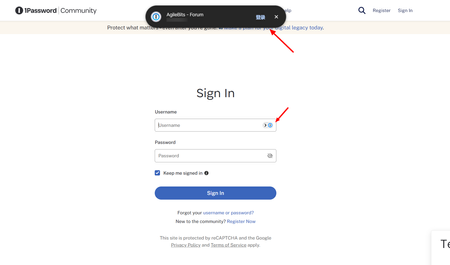
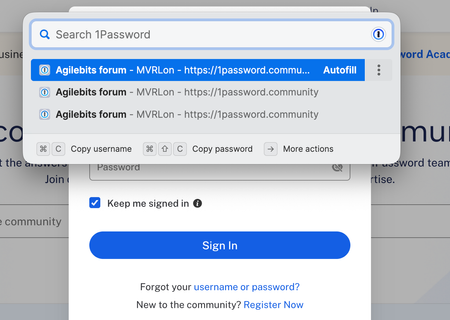
So I was suddenly being upgraded to this new experience today, however, it does not seems to be appearing on the https://releases.1password.com/b5x/beta/#changelog. I guess making the login selection up above resolves one very specific issue - sometimes it can annoying to have 1P prompting under a text box, especially when filling in forms. But I don't think this new design is the answer. Main issue - Long mouse travel - Instead of just flicking my mouse to choose my account, I now have to move my mouse all the way top to click it, which is never a trade off I would take to fix the "filling in the form" issue. Secondly, it was not visually better to have a much larger pop up blocking my web view whenever I am logging in.Solved104Views2likes2CommentsGerman translation issue on Identity
As you can see, selection criteria and texts are in English on German language in Identity item. Could you please correct them? Also, it would be nice if you can add passport details, ID card details, social security numbers (Versicherungsnummer), tax identification number (Steuernummer or Steuerliche Identifikationsnummer), and so on to the Identity item.60Views1like10CommentsTransparency gone from drag and drop under Wayland
The fix that allows dragging and dropping credentials, at all, also breaks the transparency that facilitates hitting the drop target. It only occurs when the ELECTRON_OZONE_PLATFORM_HINT=auto environment variable is set, and it makes the content fully opaque, complete with little black triangles at the corners, outside the rounded blue corners of the dragged item.11Views0likes1CommentUnable to update to the beta from the production version
Hi, A while back I accidentally switched to the Nightly channel. I since switched back to Production and waited a Production build to release. I am now on Production and want the beta. I have switched to the beta channel but when I check for updates I get nothing. I've checked the releases page and there are definitely beta builds with higher version numbers than my current Production install but it refuses to update me to them. Why?12Views0likes1CommentSupport additional browsers outside of 'Program Files' on Windows
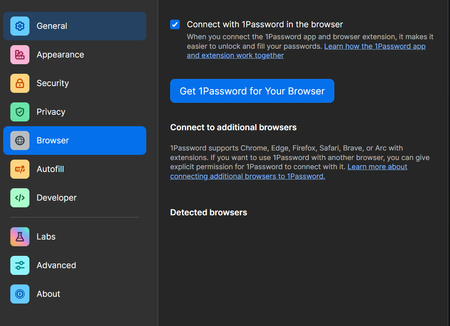
I've just installed the latest nightly version of 1Password, which finally introduced the 'Connect to additional browsers' feature on Windows. I wanted to try it out right away, but sadly Chromium (forks) usually install under AppData at user level. This shouldn't be a problem, since 1Password supports other Chromium browsers, such as Comet, which install under AppData. However, if you try to pick a browser outside of 'Program Files', you get this error: I'm sure there's a security reason behind this, but please let me decide what I see as secure on my system. So far, the only way I've managed to install a Chromium (fork) browser in the 'Program Files' folder was to use Winget with the '--scope machine' argument. However, smaller browsers often aren't really up-to-date on Winget (or aren't available at all) but I guess that's what 1Password wants me to use then, an outdated winget version of such browser... At least allow browsers installed under AppData/local, so that this feature will actually be useable for most people (many non techsavvy people aren't even aware of Winget).143Views0likes4CommentsYour saved data appears to be newer than this version of 1Password can use
I seem to have gotten myself into a pickle. I was using the Beta channel but at some point it installed a Prod release and never picked up any more Beta releases. So I switched to the Nightly channel and installed it. And then changed the channel back to Beta hoping that it would correct itself. But it only ever kept downloading Nightly releases. So I downloaded the Beta installer thinking that might fix the issue and now I'm getting this error as soon as I try to open the app. "Your saved data appears to be newer than this version of 1Password can use. Please update 1Password to its latest version. Contact support@1password.com for help." I see in this thread you mentioned something that may be related. How can I get 1PW back up and running?Solved29Views0likes3CommentsThe Advanced setting "Release channel" is not respected
Hi! I did set my 1Password 8 App to the "nightly" builds channel a few weeks ago. At present, I am running: 1Password for Mac 8.11.22 / 81122010, on NIGHTLY channel My advanced setting for the channel is: PRODUCTION / install updates automatically When I click the "Check for updates" button in the About panel, always a new nightly build is installed. I just got 81122010 a few minutes ago. I also tried to set to BETA, but no new beta build has been installed for weeks, although new beta versions were announced on the website. How can I make sure that 1P does really install builds from the correct (selected) update channel?51Views0likes4CommentsUnlock 1Password with Passkey
I think it’s maybe at least 3+ years since 1Password team enthusiasticly introduced us to this very important and potent feature. They offered excellent educational blogs and detailed articles that 1Password is so well known for. The project appeared to be already in the works. As I recall, the buzz and anticipation lasted about 1.5 years. Apart from Beta testing by some users, there has been no substantial (if any) communication from Agilebits (that I am aware of) about the project. As paid subscribers, I feel entitled that we be informed of the project status. Please?Solved90Views0likes1Comment