Our community is getting an upgrade on July 2nd! Learn more in the FAQs →
experience
61 Topics
Suggestion to Improve accessibility at app login time
Suggestion for a feature: At login time, when 1passwords starts, the Windows focus is set to password. Please consider this improvement and use scenario: focus is set on password user presses [Tab] to move focus to the "eye" icon to reveal/hide password user presses [Enter] or [Space] to reveal password. Result: the password field will show plain text chars from now on. The Windows focus remains on the reveal/hide button. Suggestion: instead of leaving the focus on the reveal/hide icon, set the Windows focus to the password input text. Justification: When i work remotely from home, I do not need to worry about stranger eyes reading my password. In this case, I prefer to type my password to the app on plain text. Due to accessibility issues, I try to use keyboard entry and keyboard shortcuts as much as I can. And i try to minimize the keystrokes as much as I can. Bringing the windows focus back to the password input field would help me. Additionally, once I logged-in I would appreciate if the 1password app would minimize itself. Maybe this could be a setting that users can turn on/off. Thanks in Advance! Marcelo Finkielsztein38Views0likes0CommentsiOS 26.2 AutoSave Incorporation Possibility?
Recently, other password managers like NordPass have https://nordpass.com/blog/nordpass-ios-update-notes/#nordpass-4101-latest, which acts the same way the 1Password Browser Extension does, where it automatically saves login info upon logging into an app or website. In theory, 1Password should be able to mimic this capability, correct? It's only available on iOS 26.2 and above, but this capability SHOULD make the hassle of saving passwords & logins on iOS & iPadOS practically non-existent. I've seen that in the https://releases.1password.com/ios/beta/#1password-for-ios-8.12.6-31, there was a patch note that read... It’s now easier to generate and save passwords when you use Autofill. ...but that doesn't specify whether autosave is incorporated yet or not, and the Testflight beta is at full capacity, so I wanted to see if I could possibly get some clarification.119Views0likes7Comments
Billing page submit button inactive - cant renew
Hi ive been trying to update my payment details on the billing page and the submit button is inactive (just circling). Ive sent 3 emails and one to community and no response. Theres no billing page on the app. Can someone from the team contact me ?28Views0likes3Comments
Keyword search with 'create new item' being wonky
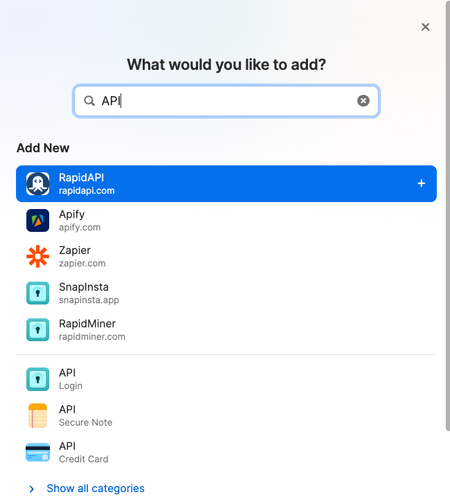
So this is just a small thing I've been battling for a little while, not sure if a bug or by design. When I go to create a new item via the 1password app on MacOS, specifically an API key entry, I always search for API to get the template, because that's in the title of the credential I want to create so I assume that will get me there. When I search for API, the API credential option does not show up. But when I search key, THEN it shows up as on option. Even if you search for the exact asset by name, it still doesn't show up So I thought that maybe I was using this wrong or searching for what I wanted incorrectly, But if I search credit then credit card shows up no problem. Same thing for Identity So I guess this is a bug report, but maybe a feature request, but maybe 'i might be doing something wrong'? Thanks XD30Views0likes2Comments
Is there a 1Password Referral Program?
I'm aware of the formal Affiliate Program on CJ Affiliate, however CJ is a high threshold affiliate program with a tax ID, etc. I'm wondering if 1 Password has a simple referral code I can send to people to sign up. I sign up clients, friends, and followers weekly. 1Password is easy for tech people but the majority of non-tech people can't be bothered by this stuff and the conversion of direct personal referrals is higher than posting on social media via an official program like CJ. I use CJ for my formal social media partnerships and it's not a great match for 1Password. It would be appreciated to get some kind of credit for it, since none of them would sign up without my help. Almost every other platform has something like this.1.4KViews2likes8Comments
Account unexpectedly deleted
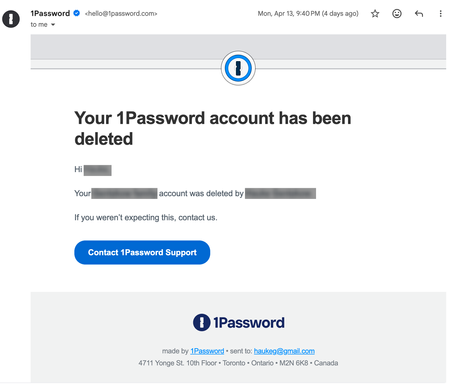
Hey 1P_Dave and 1P_Blake - I hate to be another voice of anger around 1P customer support, but its my only choice. Customer support issue: Account deleted. I have been using 1P for many years, loving it, but wanting to onboard my wife and 2 kids. It has always been such a hurdle to get it setup and to get the wife and kids to understand how to use, so I have out if off for years. Well the other day, my wife asked for a CC# and I was tired of sending her a link for the temporary view - so decided to bite the bullet. I asked her to download the iOS app so I can just get her setup at least. After she downloaded the app on her phone, we realized my account was associated on it - as years ago I had her download it and I logged in for something. Ok, no problem, I just need to remove my account and allow her to create one from my Family Plan QR code. In an attempt to remove my account from her phone app, I found the Delete account and assumed that meant delete from this app, but no - my whole account is gone - POOF! Ok, that cant be that easy right? No it is, ok, then I need to figure out a way to recover with my "Recovery Kit" - but nope. I just don't exist when I try anything. REALLY? Its that easy to destroy years of work and thousands of passwords, in a tool I have paid for and trusted for years? And please, dont tell me I should have been more careful or the thing I clicked was clear that it would delete my account. So I received this email indicating that my account was deleted, and "was it you?" Why yes it was, not by choice, so I will just hit this customer service button, they got my back! I mean, if someone else had done this, I would expect they would help me recover from that - they caught it and emailed me. That led to a form where I filled out my issue, but its late on a Monday night, I may not hear back til tomorrow. I then thought, I should just email customer support as well. Both created tickets for me, and I got emails with a ticket number and saying I would hear back asap. So I am hitting refresh on me inbox daily, hoping and waiting for help. Nothing. Not in Spam. So then I create another ticket (#3), hoping that will help. Each day I feel the pain of NOT being able to log into EVERYTHING in my daily routine. Do I reset, or will 1P respond soon and save me? Can they even, what if they say "It's all gone...?" Well here we are, Friday - 88 hours later - and still nothing, not even a "we will get back to you" message, just a vacuum. I keep feeling the paper-cuts several times an hour of not being able to log into something that became an after thought. So, I had to find another way, thats how I got here, thanks to Gemini (see attached). So sad that this is my only way to get direct access for an urgent issue. Shame on you for treating loyal paying customers who rely on your service to get through the complexity of their lives. So disappointing. This is a time when software services are in severe danger of becoming irrelevant as better and easier solutions will keep coming as AI advances. You will be obsolete with this kind of service. Sincerely, Ticket #'s: 570009 / 569997 / 572326132Views0likes3Comments
Locked out after 1Password 7 → 8 upgrade on iOS (local vault gone?)
Hi everyone, I’m stuck after upgrading from 1Password 7 to 8 on iOS and hoping for guidance or confirmation from others who’ve seen this. I was using 1Password 7 with a local/standalone vault After upgrading to v8, my account is frozen and I can’t access my data I’m sure my password is correct and I still have my Secret Key I did not create a recovery key (missed that step) I only have iCloud backups What I tried: Wi‑Fi + cellular fully off Opened 1Password 7 offline v7 no longer shows the local vault and only pushes account sign‑in I can’t access data in v7 or v8 Support replies are very slow (a week+). So far the only suggestion was to delete my account, which I don’t want to do unless I know recovery is impossible. I even asked if they could temporarily reactivate my account (trial or paid month) so I can export my data — still no response. Question: how i can get access to my account for a couple of days just to extract my data I think i got my account active again and they send me the email to create recovery code can solve the issue Any insight from staff or users who went through this would really help. Thanks.48Views0likes1CommentSuggestion: Ability To Dismiss In-App Notifications/Pop-ups
I’ve suggested this perhaps years ago, but it still hasn’t been fixed. When you add an item in 1Password, for example, a pop-up message shows allowing you to go to the new item. Please add the ability to dismiss these popup messages, as multiples of them can stack, and you can’t dismiss them manually. In other words, it gets in the way. Thanks14Views0likes0CommentsSuggestions for helping older folks get used to 1Password
Hi all! Congrats to the 1Password team for kicking off this new platform! I've been struggling to get my parents used to the workflow around using 1Password, and all of the important qualifiers: using passwords only once, saving a password each time they create one, using 1Passwords password generator. Wondering if y'all have any tips and tricks for making 1Password particularly useful for tech-averse or elderly users. Their main devices are ipads. Thanks in advance!171Views0likes2Comments