Our community is getting an upgrade on July 2nd! Learn more in the FAQs →
family
146 Topics
UniFi 2FA Automatic Filling Fail
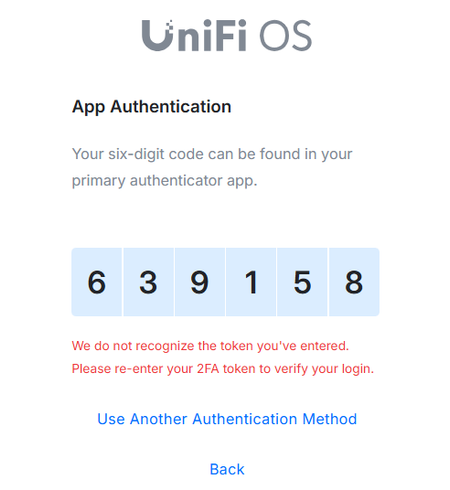
Hello, I did some research and found people with the same issues but couldn't resolve my problem. Basically, when I log in to UniFi, the autofill works as expected BUT the 2FA is not working. If I copy and paste the code, then it works. Anybody dealing with the same issue? I tried deleting all the browser hostory including literally everything but it does not work. I have the same issue with Chrome and Edge. I have attached the printscreen. It used to work before but for some reason stopped a few weeks ago. Any input would be appreciated. Thank you!169Views1like10Comments
Passkeys with Google Intermittently Ignore 1Password Extension and Show QR Code
Gmail/Google has a login stored in 1Password with username, password, TOTP, and passkey. I use Mac, iPhone, iPad, Linux, and Windows. The Windows machine is for work, and on there I have only the browser extensions for 1Password. When signing into Gmail daily it will intermittently show me the passkey in 1Password and let me sign in with that, whereas at other times it will show me the QR code on screen to then scan with my iPhone. I can still get in, but it would be nice if the browser extension always kicked in (or was able to scan the on-screen QR code) so that I wouldn't need to use an iPhone camera to scan the code.1View0likes0CommentsTOTP Scan QR Code Is Limited to Camera, but I Want On-Screen
I went to edit an existing login to add a one-time password and it let me tap to scan a QR code but the only option was with the camera (as if the QR code were off the device). If the QR code is on the device itself and is on screen, can the 1Password app scan that? Workaround was to use an iPad to edit the login and iPad camera took a picture of the iPhone screen. Another alternative would have been under the QR code was an option to get a code. iPhone 16 Pro running iOS 18.6.2 with 1Password for iOS 8.11.9121Views1like2Comments
Family Subscription Count Exceeded
Hi, Did anyone have this problem? Any fixes or how to get Support to get interested and fix this for me? I have a family subscription allowing up to 5 Logins. Originally I setup 4 accounts and then deleted 3 of them to change the email address (I didn't realise I could change email for an existing acct) ... After deleting the old logins, the system now thinks I have used those licenses and so I can't add the entire family back in with their new email addresses. Obviously 1Password back-end doesn't update when old logins are deleted. Not sure how to fix this other than buy an entire new subscription and export everything out and re-import to the new subscription. Hoping someone knows some fix for this situation? Thanks50Views0likes5Comments
AI Agent Support for Individual/Family Plan
Hello, I am an individual looking to signing up to 1password for my personal or family plan for myself/my family. I am also a developer and plan to work on personal projects on my own time (i.e. not for work or a business), and want to leverage AI agents for these personal projects. I am aware that 1password supports some features to regulate permissions & access of AI agents. Are these only available for business/team plans or can these be used on personal or family tiers? Could such usecases be emulated on family plans by setting up an agent-specific account to my family plan? Thanks35Views0likes1Comment
login difficulties
My wife and I are both set up as family organizers on our family account. When I try to use 1Password and click on the 1Password symbol in a username line, it will not take my login. I have to put my wife's 1Password password in to log in. Why would this be happening? Thank you, Rob1360Views0likes7CommentsHow to transfer my vault from an account owned by my former partner to my own 1Password account?
Hi everyone, I'm hoping to get some guidance on migrating my data to my own account. Currently, all of my passwords and items are stored in a vault under a 1Password account that is owned by my former partner (it's their family/shared account, and I'm a member). For obvious reasons, I'd like to move everything over to a brand new 1Password account that I own and control myself. A few questions: Is it possible to transfer or export my vault(s) from their account into my own new individual account? What's the recommended way to do this — is there a direct vault transfer option, or do I need to export my items to a file and re-import them? Are there any items that won't transfer cleanly (attachments, passkeys, document items, etc.) that I should watch out for? Once everything is moved, what should I do to make sure my data is fully removed from the old account? I still have access to the items right now, so I'd like to handle this before anything changes with my membership on their account. Thanks in advance for any help!42Views0likes2Comments
Unable to create a new vault in Family Plan
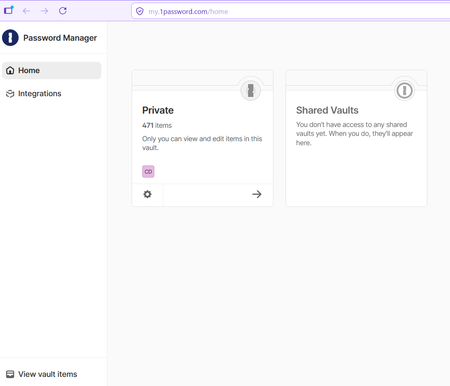
Hi, I have just joined a Family Plan as a member. I installed the Windows app and extensions in two different browsers (FireFox and Edge), in case that matters. I am unable to create a new vault in either the Windows app or when I login online. When I log in online, this is what I see: In the Windows App, this is the menu I have: Note that there is no + sign as the help instructions suggest there should be. When I click the three dots at the top, I get a "New Vault" option but it doesn't do anything: Am I supposed to be able to create new vaults? There are two other family members on the plan and they have been able to create vaults. Thank you. CDB25Views0likes1Comment
Merging Duplicates
I know that the general response is to manually do this, but doing this with 1000+ objects is impractical to say the least. Some were created because when I migrated to 1Password, some duplicate/corrupt entries already existed in my profiles on Avast, Google, etc, which I did not notice at the time. Unfortunately, some have been created since then by either less tech-savvy family members on their own accounts or how 1Password is asking more often regarding site/app trust & permissions ("Allow fill once") and is thus creating duplicates of its own accord. The fact that merging wasn't already added a while back, considering how many people have asked about it over the years, is interesting to say the least. And yes, I have been attempting to create my own tool for quite some time, but it is difficult to find time to work on it lately, on top of not being successful in general.195Views1like7Comments
Microsoft Edge Extension repeated failures
I use Microsoft Edge as my main browser. The current browser is Version 148.0.3967.83 (Official build) (64-bit). 1Password is version 8.12.21 and is listed as being up-to-date. Windows 11 is also up-to-date. I am having a repeating issue where the extension fails. This can happen even overnight when I have simply closed the lid on my laptop (like last night) and then opened it this morning. So its not like a new version of Windows or Edge installed. In fact I have tabs in Edge that are still open. Other apps (e.g. Microsoft Excel and Outlook) are still open as well. Please note, I can bring up the 1Password app but the autofill feature does not really work well with the extension in this failed state. I have found a workaround that works, which is deleting the extension and then reinstalling it from the Microsoft store. This is getting to be annoying, but I can deal with it. However, my wife is not technically proficient and this is keeping her from migrating to 1Password from Lastpass. Can you please let me know how I can resolve this problem without using this workaround.38Views0likes2Comments