Our community is getting an upgrade on July 2nd! Learn more in the FAQs →
macos
5432 Topics
Safari Browser Extension Fails to Suggest Autofill
This has happened before, but I caught it this time. The most recent macOS beta 1Password-8.12.26-31.BETA-aarch64, breaks the autofill function if used with Safari browser extension 8.12.21, which was just released. Reverting to version 1Password-8.12.24-aarch64 resolves the issue. I suggest the testing process should be modified to look for this issue.7Views0likes0Comments
[Bug] Custom Login Icon Not Displayed in Passkey Browser Pop-up
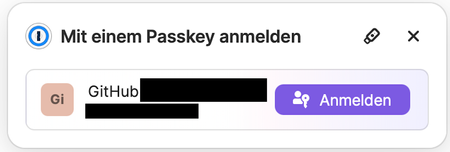
Description: When using a passkey to log in via the browser, the pop-up that appears does not display the custom icon defined for the login. Instead, it only shows the initials of the login name (for example, "GH" for a GitHub login), ignoring the custom image that was set. Steps to Reproduce: 1. Set a custom icon/image for a login (e.g., GitHub) 2. Initiate a login using a passkey in a browser that supports passkeys 3. Observe the passkey authentication pop-up Expected Behavior: The browser pop-up should display the custom icon associated with the login. Actual Behavior: The pop-up displays only the initials of the login name (e.g., "GH"), and the custom icon is not shown. Environment: Browser: Safari Version 18.4 (20621.1.15.11.10) OS: macOS 15.4.1 (24E263), iOS / iPadOS 18.4.1 1Password Browser Extension: Version 8.10.70.27 1Password for Mac: Version 8.10.75 (81075001) Additional Information: This issue may affect the user experience by reducing brand consistency or recognizability in multi-login environments.Solved177Views0likes6Comments
Cannot use 1P for passkeys in Google OICD login flow
This is a tricky one to explain but I've run into this problem a couple of times. I did not take any screenshots and subsequent repro attempts have failed because my login hits a fast path and I don't see any web UI. My Google Account has a passkey on it. When a particular Mac App (NetNewsWire) opens a browser window to initiate a Google Account login, the window has no UI other than the location bar. This is important. When I get to the screen in the GA login flow where it asks for my passkey it gives me two options to source my passkey from, neither of which allow me to pick 1P. And because there is no other browser UI in the pop-up window, there is no 1P extension icon to interact with. I tried using the 1P Quick Access app but it didn't register what was happening. I have to use another login method (secure code, backup code etc) to successfully complete the login flow. It is a process of trial-and-error and I'm concerned my activity looks suspicious and will result in an account lockout. Does anyone have suggestions on how to fix this?38Views0likes4CommentsFrequent sign-outs from 1Pwd under MacOS
This is a recent behaviour change. Now, running 1Password under MacOS, 1Pwd regularly “signs out" – maybe on average something like every hour. The main 1Pwd window (account – all items) changes to a lock window, and I need to re-enter my password. This is new behaviour which began I think round about two months ago. No changes have been made to MacOS or other system software but 1Pwd has been updated regularly, and I suspect the behaviour change came after a 1Pwd update. ? MacOS 15.7.2 , 1Pwd 8.12.22, Safari extension 8.12.12.4424Views0likes1Comment
Mac - shortcut conflict
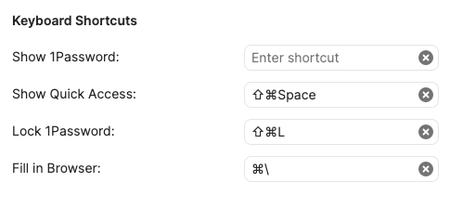
Since I installed 1password 8 on my Mac I have a shortcut conflict regarding Hold Command + ` (tilde key, to the left of 1 on your keyboard). This regular mac shortcut is used to switch between windows of the same app. Since I updated 1password it makes the 1password app appear like the new quick access. The Mac shortcut is still set for next window. 1pass doesn't indicate any usage of this shortcut. I include screen copies of those configs. Any help is welcomed. 1Password Version: 1Password for Mac 8.7.0 80700098, on PRODUCTION c Extension Version: chrome ext. 2.3.3 OS Version: Monterey 12.3.1 (21E258)1.2KViews1like15CommentsWhy is the top search result default instead of all results?
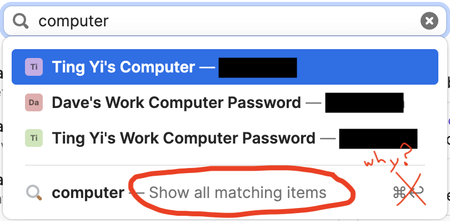
The way I search — like the vast majority of people in user testing I have done at my place of business — is to type a few things and hit return. Then you peruse a full list of filtered options. It is not to type a few things, stop yourself from hitting return and examine first item on the "suggested list" to see if it is the one you want and THEN hit return, and if it isn't... then continue perusing a list of suggestions in a menu dropdown, and when you don't find a suggestion with what you needed, select "Show all" at the very bottom and finally get the list you should have had at the very beginning. That former was the old behavior in 1Password, and it is the behavior of almost every other app anywhere ever. Type, hit return, get filtered list. But now it's the latter. Type, hit return, get one result that is completely wrong. Redo the search, and go through three steps to get to the same thing that should have happened when you first searched. Maybe this unintuitive UX decision is a preferred method for a few people at 1Password, after all, our user testing always shows outliers, so sure... keep it. But for goodness sake, please make it an OPTION, and not the unalterable default. When I type a search, I want ALL results. Every time. I don't want one, unless I slow everything down and carefully follow "procedure." Yes, you can argue, "Well just hold down command key when you hit return." But since this is behavior used by no other app, I have to train my brain to change behavior for just this one app. And I've tried, but it won't stick. Please just give us the old style back as an option at least. I have accidentally selected the top result 99% of the time in 1Password 8, and it has been the wrong thing 90% of the time. 1Password Version: 8.9.10 Extension Version: Not Provided OS Version: macOS 13.0.1 Browser:_ Not Provided794Views3likes21Comments
MacOS Feedback - Inconsistent Surfacing of Expiration Notification for Date Fields
I'm not sure if this is just a MacOS Desktop App issue. It could apply to other platforms as well, I only have access to MacOS and Android platforms. I am sure this is happening on MacOS though. I would appreciate it if expiration/notification dates for date fields were reliable about appearing when creating new date fields. At first this feature was really confusing, but now that the date formatting has improved some (still needs more flexibility on choosing date format though) I find this feature incredibly useful and would prefer to get push notifications via 1Password rather than having to use my task manager to remind me when expirations are coming up for credentials and other time-limited documents or objects stored in 1password.10Views0likes0CommentsmacOS AutoFill is now in public beta!
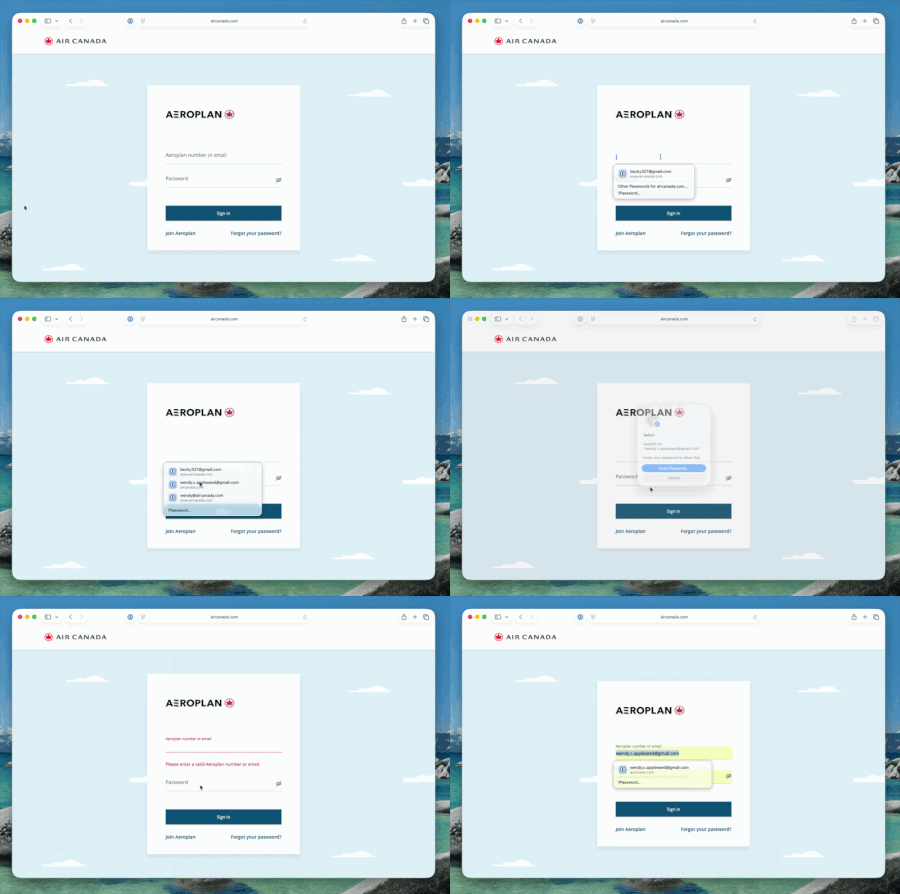
Hey everyone! We're excited to share that native macOS AutoFill is now available in public beta for 1Password. This has been one of the most requested features for years, and we're now at a point where you can test it out and give us feedback! What's new in beta: By adopting Apple's Passwords API, 1Password functions as a native Credential Provider on macOS for logins. You can view autofill suggestions directly within Safari and other supported desktop apps. Passkey support is included in this beta as well. Fill, create and update passkeys easily through macOS autofill. The 1Password Safari extension can be used alongside macOS AutoFill to access additional features not currently supported by the Passwords API. Coming later in Beta, you can set up one time codes using the same integration. How to try it: Update to 1Password for macOS 8.12.22 or later from the beta channel. Make sure you’re on macOS 14 (Sonoma) or later on Apple silicon. Go to 1Password for Mac Settings > Autofill > Set up macOS AutoFill, then select "Turn On" from the macOS permission prompt. You'll see "Active" status once it's enabled. Try filling logins and passkeys and let us know how it goes! We're happy to be one of the first credential managers to adopt these APIs and we want to get it right for you. Drop your feedback in the comments below!1.1KViews1like26Comments
1password cli caching (vscode)
I have a credential I need to set in an environment (.env) for Python before running a program. This is all defined via vscode tasks. I switch between 'groups' of settings (ie multiple environment variables) by just copying a template to the .env file An example of one credential is: export GITHUB_PERSONAL_ACCESS_TOKEN=$(op --cache read --account https://my.ent.1password.com/ "op://Private/Github API token/password") When my python code is run (which loads .env) I get prompted for biometrics. That's fine, except that there is no caching ie I get prompted every time. The process being run is of course different each time. Note : I initially didn't have --cache specified, and have subsequently added it after seeing it mentioned here. Any suggestions on how to cache these approvals/credentials for a short while (my intent is not to materialise the actual password in a file at any point). Do I need to write my own helper process, or is there something suitable available in the api?211Views0likes3Comments