Our community is getting an upgrade on July 2nd! Learn more in the FAQs →
microsoft entra
28 Topics
Existing Personal 1Password Accounts Using Corporate Email Addresses
Hello, We are evaluating 1Password Business for a large enterprise deployment and have a question regarding employees who may already be using personal 1Password accounts with their corporate email addresses. For example: An employee independently signs up for a personal 1Password account using their corporate email address (user@company.com) The company later deploys 1Password Business with SSO and SCIM provisioning Our primary concern is understanding what happens to the employee's personal account in this situation. Specifically: Can the employee keep their personal account? Can the employee change the email address on the personal account (for example, from user@company.com to a personal Gmail address) and continue using it independently? What happens when the same corporate email address is invited to a Business account? What happens if SCIM provisioning creates the same user? Does SSO enforcement affect the existing personal account? Are any personal vaults, items, or data automatically transferred into the Business account? Can Business administrators view or access any data from the employee's personal account? We are particularly interested in real-world experiences from organizations that have encountered employees using personal 1Password accounts with company-owned email addresses before a Business deployment. Thank you for your guidance.25Views0likes2CommentsDelegated Administration and Vault Permissions in Large Organizations
Hello everyone, We are evaluating 1Password Business for a large enterprise deployment and would like to better understand recommended approaches for delegated administration and permission management. Our goal is to allow departments to manage their own credentials and membership without requiring central IT involvement for every change. Example: Finance System Vault Finance Manager Group = Full control Finance Lead Group = Edit permissions Finance Staff Group = Edit permissions Finance Assistant Group = View-only permissions Questions: Is this a recommended design pattern in 1Password Business? Can department managers be delegated authority to manage group membership without granting broader administrative permissions? How do large organizations typically handle role-based access such as: Department Manager Team Lead Staff Assistant If Microsoft Entra ID or Okta is used with SCIM, do most organizations manage these role memberships in the IdP and synchronize them to 1Password? Can permissions be differentiated for individual items within the same Vault? Example: Finance Vault Record A = Finance Assistants can view Record B = Finance Assistants cannot view Is this possible within a single Vault? Example: 6.If item-level permissions are not supported, is creating separate Vaults considered the recommended design pattern? 7.Have you encountered situations where Vault-level permissions were too coarse-grained? If so, how did you structure your Vaults to balance security and manageability? We would appreciate hearing real-world examples and best practices from organizations operating at scale. Thank you.13Views0likes0Comments
Error when onboarding new SSO User
1 Password for Enterprise SSO Method Entra Hosted SCIM Managed Group When I add a new user to a group to automatically onboard them now, when the user gets to the email verification step, that user gets "An Unknown Error Occurred" "Contact your account administrator for help.". below that in the response is "Error(SecureChannelCreateSession(Fetch)) \r\n at /builds/dev/cc/confidential-computing/crates/internal/cc-secure-channel-client/src/lib.rs:445" This did not happen with the first user to onboard through this group, but it has happened with all others. After 48 hours I was able to re-invite one of the users and push them through, but I want to know how to avoid this in the future.72Views0likes2CommentsChrome passkey popup
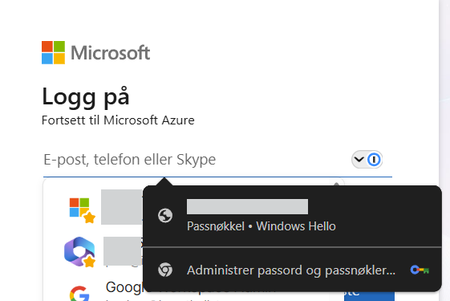
I have this issue where Chrome's passkey popup overlays 1Password. The device is Entra joined and the passkey is bound to the device. Deleting the passkey in Windows settings is not an option. Everytime i visit a Microsoft login page the Chrome passkey popup also shows over 1Password. This only happens when using Windows 11 + Chrome. Using Windows 11 + Microsoft Edge does not show any popup from MS. 1Password is set as the default password manager in Chrome Any recommendations? 1Password Version: 8.12.10 Extension Version: 8.12.12.44 OS Version: Windows 11 25H2 | 26200.8246 Browser: Chrome 124.0.7444.163Solved115Views0likes3Comments
Edge Authentication Window when using Microsoft SSO
Hello! We have configured Microsoft/EntraID SSO for login to 1Password. The users are logged in to the Windows PC with an Active Directory User - the Users are synchronized to EntraID, where SSO with 1Password is configured. Recently we are experiencing the issue, that for every first 1Password unlock after a PC restart, when we click "Login with Microsoft" in 1Password, a Browser window opens, asking for the Microsoft 365/EntraID login credentials. The login to 1Password is successful anyway, either if we enter the credentials in this window, or if we do not enter any credentials and close the window. How can we prevent that Browser window asking for credentials? Is there something we need to configure on 1Password side? Thank you and best regards, Michael17Views0likes0CommentsManaged Update of Intune Win32 App
I deploy 1Password via Intune, and I recently transitioned our deployment from the MSI installer to the MSIX installer—as a Win32 app in both cases. I prefer to manage the deployed version and so disable Auto Update. When deploying using the MSI installer, I used a File detection rule that checked for the presence of the app and also checked the version. Rule type: File Path: C:\Program Files\1Password\app\8 File or folder: 1Password.exe Detection method: String (version) Operator: Greater than or equal to Value: 8.x.x Associated with a 32-bit app on 64-bit clients: No With this process, when I updated the installer version, I would update the version value in the detection rule, and Intune would update the installed version of 1Password when it detected a version number less than the expected value. Because the detection script provided for the MSIX deployment—AppDetectScript.ps1—does not include a version check, updating the installer version has no effect on devices where 1Password is already installed. Intune will report that the latest version is installed, but that is only because it is finding 1Password, not because it is finding the latest version of 1Password. I modified the script to include a version check, in hopes that that Intune would then behave as it had with the MSI installer, installing the latest version of the app when it detected that the installed version did not match the target version. # Modify the $targetVersion to ensure app updates $targetVersion = "8.12.10" $targetVersion = [Version] $targetVersion.ToString() # The unique 1Password identifier in detection scripts. $targetPackageFamilyName = "Agilebits.1Password_amwd9z03whsfe" try { # Per-user install (eg. Install behavior in Intune is User). $package = Get-AppxPackage | Where-Object { $_.PackageFamilyName -eq $targetPackageFamilyName } if ($package) { $ver = [Version] $package.Version.ToString() Write-Host "1Password is installed." if ($ver -ge $targetVersion) { Write-Host "1Password is up to date." exit 0 } else { Write-Host "1Password requires an update." exit 1 } } else { Write-Host "A 1Password installation wasn't found." exit 1 } } catch { Write-Host "An error occurred when detecting a 1Password installation: $_" exit 1 } As far as I can tell, the detection script worked, in the sense that it started registering the app as not installed—"The application was not detected after installation completed successfully"—but it did not cause the installed version to be updated. I know that the https://support.1password.com/deploy-1password/?windows#step-1-plan-your-deployment-windows states: To allow your team members to update 1Password, deploy the MSIX as a Win32 app and set the install behavior to User. To manage and deploy updates to 1Password, deploy the MSIX as a line-of-business app and set the install behavior to User. But all of our other Intune app deployments are Win32 apps, and, https://learn.microsoft.com/en-us/intune/intune-service/apps/apps-win32-troubleshoot#:~:text=If%20you%20mix%20the%20installation%20of%20Win32%20apps%20and%20line%2Dof%2Dbusiness%20(LOB)%20apps%20during%20Windows%20Autopilot%20enrollment%2C%20the%20app%20installation%20might%20fail., Win32 and LOB apps do not mix well when using Windows Autopilot (which we do): If you mix the installation of Win32 apps and line-of-business (LOB) apps during Windows Autopilot enrollment, the app installation might fail. I was hoping it might just work. Since it seems as though that is not the case, I was wondering if there is a technical reason why the MSIX deployment does not work as the MSI deployment did, if there is a chance that modifying the detection script in some way could work, and, given the answers to the first two questions, if there is some way this setup might be made to work in the future?102Views0likes0CommentsSystem Down due to Expired Client Secret
I'm in desperate need of some support here. Our Notion alert that the client secret for our 1Password Entra ID SSO was expiring did not alert like it should have and we are now all locked out. There seems to be no way to bypass and use the emergency kit to update the integration in 1Password. I have opened a support ticket, but it isn't moving fast enough. Is there a way for Administrators to bypass SSO and get back in using the emergency kits that I'm missing?59Views0likes0Comments
Cannot Complete User Recovery
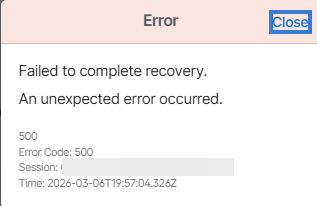
Hello, We have a user that was put into recovery and completed their steps via email. However, when an admin tries to complete the recovery, this error pops up. This has been consistent over the past 48 hours for this specific user. We use Azure SSO with a SCIM. Any help would be greatly appreciated.Solved69Views0likes2Comments
Managed Browser Extension
Hey all, New to 1Password for Business, long time 1Password personal user. I've just kicked off migration of legacy password manager (on-prem) for about 500 users in a Microsoft Intune full cloud environment. Our org has strict management over our Windows 11 devices... (you know, any HR opportunity to educate staff starts with I.T doing all the work with tech removing any need to teach users how to do something) I need to manage the browser extension, the usual default save vault location and watchtower etc. i thought i was on a winner with MDM ADMX - https://support.1password.com/mobile-device-management/?windows#appendix-set-the-default-vault-for-saving-new-items but this looks to be the full app rather that anything for the extension? How can i directly manage the extension via Intune?71Views0likes0Comments
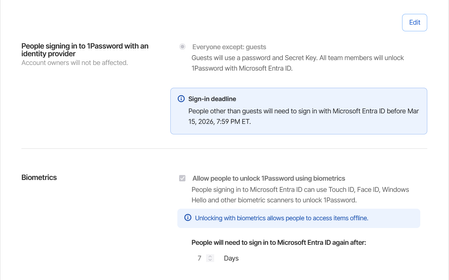
Microsoft Entra ID SSO issue
We have recently migrated all our users over to using Microsoft Entra ID SSO. It works fine except every time they close the app or shutdown their computer, it asks them to login using SSO. We have a set of employees who do not always have a connection available. They go from site to site and some basements where they need to go don't have network or wi-fi. When that happens, they are unable to use 1password. Keep in mind that most of the time when they access these places they are escorted by security to go down in the basements and it's wasting their time as well as the security employee. We have it set to ask the Entra password every 7 days. Expected behavior: if I close the app or restart the computer, the token should still be valid. Current behavior: Every time I close the app or restart the computer, I have to login to the microsoft account again.148Views1like1Comment