REMINDER: the community is in read-only mode until July 2nd. This is part of our platform upgrade! Learn more in the FAQs →
Forum Discussion

Anonymous
4 years ago1Password 8 date and time formats
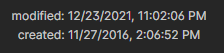
1Password 8 doesn't respect my date and time format settings:
My preferences in Windows are:
How to make 1Password to honor system settings?
1Password Version: 8.4.1
Exten...

ag_mike_d 1Password Team
3 years ago1Password TeamHello @CliveARiches,
I'm sorry for the issues you've been encountering with the Beta channel. The version number you are referring to 80911019 is on the production channel and has surpassed the last Beta released due to a hotfix on December 15. This fix is included in the Beta but has yet to reach Production.
If you're up for it, could you try changing the release channel to Nightly instead of Beta and let us know if this helps resolve the date formatting:
1. Open and unlock 1Password.
2. Click your account or collection at the top of the sidebar and choose Settings.
3. Click Advanced, then set “Release channel” to Nightly.
Once the update completes, you can set the release channel back to a preferred channel and the version of 1Password will catch up as updates release.
Let us know if you run into any other troubles.


