Protect what matters – even after you're gone. Make a plan for your digital legacy today.
Forum Discussion

Former Member
5 years ago2FA/QR not showing on website
Hey,
Do we know why the website is not showing the QR code scanner anymore? I can see it on the extension but we used to have it on the website and now this is not showing anymore,
Th...
Former Member
5 years agoHi @renato90!
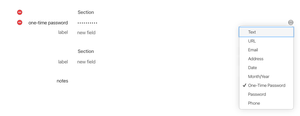
I actually don't remember this feature being present on the 1Password.com website, it always required either a 1Password app or the 1Password browser extension to be able to scan QR codes. https://support.1password.com/one-time-passwords/#to-save-your-qr-code-on-1passwordcom still mentions this:
On the website, choose to enter the code manually. Copy the code, then paste it in the One-Time Password field.
If the website only supports QR codes, you’ll need to scan it using a 1Password app.


