Level up your business security with free, on-demand training and certification. Explore 1Password Academy today →
Forum Discussion

namiaro
1 day agoFrequent Contributor
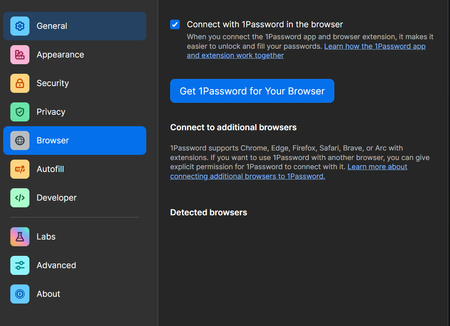
Detected browsers list is empty on 1P for Windows
Hey, I'm just wondering, should detected browsers list in 1Password settings be empty? Brave and Edge extensions connect just fine with 1P Windows app, everything seems to be working, but I'm curiou...

ChrisC1P Moderator
7 hours agoModeratorHi namiaro thanks for reaching out.
The Connect to additional browsers section is meant so users can add browsers they use that aren't officially supported by 1Password. Our officially supported browsers are Chrome, Edge, Brave, Firefox, and Safari so there's no need to add those browsers to that section.
If you're signed in to a 1Password Business account, it's possible that this setting was disabled by your IT team and so I'd recommend reaching out to them to see if that's the case: About mobile device management
If you're not signed in to a 1Password Business account, I'd like to ask you to create and share a 1Password diagnostics report from your Windows PC: Send a diagnostics report (Windows)
Attach the diagnostics to an email message addressed to support@1password.com
With your email please include:
- A link to this thread: https://www.1password.community/discussions/1password/detected-browsers-list-is-empty-on-1p-for-windows/170018
- Your forum username: namiaro
You should receive an automated reply from our BitBot assistant with a Support ID number. Please post that number here. Thanks very much!
-Chris


