Protect what matters – even after you're gone. Make a plan for your digital legacy today.
Forum Discussion

Former Member
5 years agoExtension 'unlock screen' incorrectly scaled on Firefox
Hi guys,
A recent update to your Firefox browser extension seems to have created a problem for me.
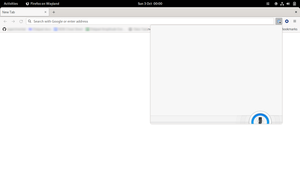
When the browser extension is locked, and I click the 1P button in the browser window, the con...
Former Member
5 years agoHi @ag_yaron,
Yes, the extension icon is pinned in the toolbar and always visible.
With two monitors connected, the problem occurs on both monitors. With one monitor connected, the problem still occurs.
I am already using the stable version of the browser extension (2.1.2). But I am running the beta version of the desktop app (80202072, on BETA channel).
I have just noticed a new pattern. The first time I click the 1P extension button in a particular browser window, it works correctly. However every subsequent time I click the 1P button in that same browser window, it is mis-sized. If I alt+tab to a different browser window and click the 1P button, it works correctly first time! But then is mis-sized every subsequent time. Switching back to the first browser window it again works correctly the first time, then is mis-sized each subsequent time I open it.
It seems that, when the 1P extension is first clicked after having been used in a different browser window, and the "Loading..." message is displayed briefly, the problem does not occur.
It appears the problem is not limited to the master password unlock screen. Once unlocked, if I click the 'settings' cog icon in the top right of the extension popup, the settings panel does not appear. (I assume it is actually opening correctly but 300px or so off-canvas.) The same "works correctly first time per-window" behaviour above also applies in this case.


