Protect what matters – even after you're gone. Make a plan for your digital legacy today.
Forum Discussion

kentsimms
8 months agoNew Contributor
Intel vs M Series versions
How can I tell if I'm running the Intel version or the Apple Silicon version of 1 Password? I have a MBP M3 Pro series.
Thank you for the reply. I am running the Intel version and do need to switch. How should I proceed?
3 Replies
- 1P_SimonH
Community Manager
Hi kentsimms,
Great question! Open your Applications folder, right click on 1Password, then select Get Info. In the Kind field, it'll say "Apple silicon" if you're running that version.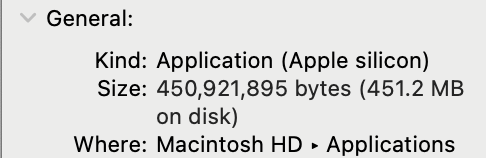
If you discover you're running the Intel version and need help switching, just let me know!
 kentsimmsNew Contributor
Thank you for the reply. I am running the Intel version and do need to switch. How should I proceed?
- 1P_SimonH
Thanks for checking and confirming! The process is pretty painless to switch.
🚨 Before proceeding, make sure that you have a copy of your Emergency Kit, that you know your account password, and that you're signed into 1Password on another device and see all of your items there.
- Uninstall 1Password following the steps in the support guide linked below, make sure to also follow the steps under "To remove your 1Password data": 1Password - Remove the 1Password app and data.
- Do not use a third-party "app cleaner" or "uninstaller" app to remove 1Password.
- Download and install a fresh copy of 1Password from our website: https://1password.com/downloads/mac/
- Add your account back to the 1Password app.
Once you have it installed, you should see a notable performance improvement.
- Uninstall 1Password following the steps in the support guide linked below, make sure to also follow the steps under "To remove your 1Password data": 1Password - Remove the 1Password app and data.




