REMINDER: the community is in read-only mode until July 2nd. This is part of our platform upgrade! Learn more in the FAQs →
Forum Discussion

rcostain
4 years agoOccasional Contributor
Issue with 1Password Chrome extension and Chrome saved passwords
I'm having an issue with 1Password for Mac and the Chrome Extension (2.3.3).
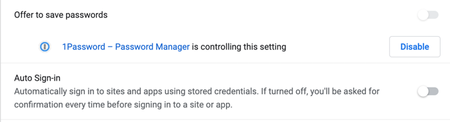
Chrome's built-in Auto Sign-in is disabled and managed by 1Password. And yet when I try to login to a site and there's...

Anonymous
4 years agoHey rcostain! Sorry about the behavior that you're seeing. If you still have passwords that are saved in Chrome, then it's possible that Chrome will continue to offer these passwords as suggestions for you to fill. To turn off those suggestions, you'll have to delete those passwords from Chrome:
- Open Chrome.
- Type in (or copy paste) "chrome://settings/passwords" into the address bar of the browser and hit Enter.
- Go to Save Passwords.
- Delete all the passwords listed there.
- Test your site again and see if Chrome is still suggesting to autofill.
As for dismissing the inline menu (the prompt that suggests logins), that can be done with the following actions:
- Press ESC on your keyboard.
- Click on a blank area in the page to remove focus from the field.
- Click the little 1Password icon on the right side of the field to toggle it off.
I hope that helps. Let us know if you have any other questions!


