REMINDER: the community is in read-only mode until July 2nd. This is part of our platform upgrade! Learn more in the FAQs →
Forum Discussion

Anonymous
2 years agom1 mac 1password desktop app does not stay unlocked when hide menu bar icon
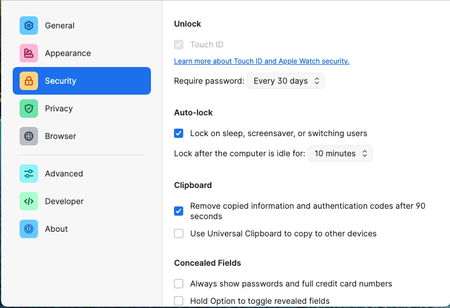
If I uncheck "keep 1password in the menu bar", then every time I close the 1password desktop app window it will auto lock itself. The setting is in the screenshot.
This affects the firefox ex...

amaridev
2 years agoNew Contributor
I have the problem as well, even with the latest beta version. It is really annoying to unlock every time I want to access 1Password.
I also can understand that you think having the menu icon enabled provides the best experience. But if every app developer thinks this way, I have 40 icons open in the menu bar.
And since Apple gifted us, with this beautiful notch, this causes important icons to disappear if too many icons are shown.
For power users with many applications in use, this is just not feasible to have an icon shown which doesn't provide any visual informational benefit to me.
Looking forward and hoping you will be able to fix it. :)
Also wanted to add, I usually prefer to use the keyboard shortcut for the quick search...which doesn't open when the application closed in the background. I have no need for the icon to click on it.


