REMINDER: the community is in read-only mode until July 2nd. This is part of our platform upgrade! Learn more in the FAQs →
Forum Discussion

Anonymous
2 years agom1 mac 1password desktop app does not stay unlocked when hide menu bar icon
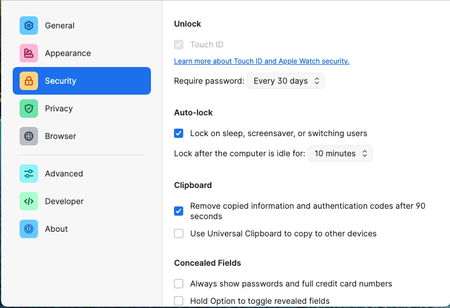
If I uncheck "keep 1password in the menu bar", then every time I close the 1password desktop app window it will auto lock itself. The setting is in the screenshot.
This affects the firefox ex...

1P_Dave Moderator
2 years agoModeratorThank you for reaching out. The menu bar icon is how 1Password signals to a user that it is open in the background and unlocked. Unlike other apps on your Mac, it's important to know when 1Password is running in the background (and unlocked) since it contains so much important personal information.
However you can turn off the menu bar icon and keep 1Password running by opening the main window and then right-clicking on 1Password in the Dock and clicking Hide. Then you'll be able to be aware that 1Password is running by seeing the black active dot underneath the 1Password icon in the Dock.
I have the problem as well, even with the latest beta version.
Can you clarify the issue that you're seeing a little more? Are you just saying that you see 1Password completely close when the menu bar icon is turned off and you close the main window (which is expected and not a bug)? Or are you seeing the issue that the original poster reported where you're unable to unlock 1Password in Firefox when the menu bar icon is turned off?
-Dave


