Protect what matters – even after you're gone. Make a plan for your digital legacy today.
Forum Discussion

Fedup
5 years agoDedicated Contributor
Not locking 1Password8 on browser close
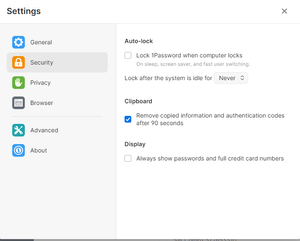
I am using 1Password8 8.4.0 on Windows10 21H1 using 1Password extension for Chrome 2.1.3. I have these settings in the app
Since this is a desltop computer I do not want 1Password to autol...

K_J__1P 1Password Team
5 years ago1Password TeamFedup With the "Connect with 1Password in the browser" option enabled, the browser extension will only lock when 1Password desktop app locks. If the browser is closed and re-opened and the 1Password desktop app is unlocked, the extension is automatically unlocked. Also, with the connection enabled, when opening the extension, you will be prompted to unlock in the desktop app instead of in the extension.
It sounds like what may have happened is the first time you closed and re-opened the browser, the app was still unlocked and then second time it was not.
In 1Password 8, under Preferences > Security, there are a few options where this behavior can be changed. For example, reducing the time to lock when idle. There is not currently an option to immediately lock when the browser connection is broken.


