Level up your business security with free, on-demand training and certification. Explore 1Password Academy today →
Forum Discussion

Anonymous
1 year agoSafari plugin not unlocking
When 1PW is locked on both the desktop app and Safari browser, if I unlock 1PW from the browser the desktop app icon will unlock, but not the browser. See below screenshot. At this point I have to cl...
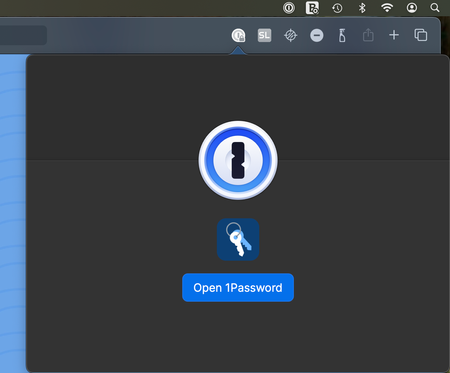
- 9 months ago
Hi peter_leblond,
I'm sharing a response I gave recently to someone having a similar experience. I want you to know that you're being heard–we have a lot of Safari users working at 1Password and we want it to work well, too!
These are fair comments and you're not the only one who has brought this up. The short version is that there are some issues with Safari and how it handles extensions that we're waiting on Apple to fix
I'll also paraphrase something 1P_Mitch, from our Product team, posted on our subreddit recently about the situation.- We feel the pain too. Lots of people at 1Password use Safari.
- It really is the APIs. Safari supports the same extension APIs as Chrome and Firefox — and 95% of our code is shared — but reliability is the issue. One long-standing bug breaks extension communication after using the Back/Forward buttons (an extremely common workflow in a web browser!). The bug was fixed in WebKit in May (WebKit bug #292378), but still isn’t in stable Safari.
- Silent failures result from Safari’s messaging system, which sometimes drops internal messages between extension components. That’s why sometimes nothing shows up on the page, or clicking the icon does nothing — the click is detected, but the message never reaches the other side. 1Password can’t detect or recover from this situation.
- New features can make things worse. Safari profiles are super useful, but they are not built with extensions in mind. Unlike other browsers, Safari doesn’t let extensions run cleanly across separate profiles. Ours conflicts with itself. No workaround, no API to help.
- Progress is uneven. Safari moves on a slower, mostly annual release cycle. Some years fix bugs; others introduce new ones that linger. The extension is less stable today than it was a year ago. We’re hoping this fall brings meaningful improvements, with some evidence (more on this below).
- It’s not just us. We use Apple’s official extension framework. Even if we dropped support for every other platform and focused only on Safari, these bugs would still exist. They're in the system-level architecture of Safari extensions.
Is there any good news?
Yes. The messaging bug I mentioned earlier is fixed in Safari Technology Preview, and it's made a big difference. We’re thankful to the Safari and WebKit folks who acted on our reports.And to be clear, we’re not just pointing fingers. We can and will continue improving the extension across all browsers, Safari included. Your feedback helps us know where to focus. Please keep it coming, and hold us to a high bar.
Regarding your question about frequent releases, you're right that we do release updates regularly and we consider this a good thing. It means we're squashing bugs and adding features! Our most detailed release notes are available at https://releases.1password.com/, if you want to dig into them!
I know the explanation doesn't make it any less frustrating when something doesn't work, but know that we're doing everything we can to make 1Password as good as it can be.


jack_allen
1 year agoNew Contributor
I thought I had already answered this.
The solution didn't work. First thing in the morning the plug in appears, identifies the target page and displays the correct login but does not respond to autofill.
If it helps I am running a 2019 Intel Mac with an i7 processor and 32MB. The system is Ventura V13.7.5.
- 1P_Dave1 year ago
Moderator
I'm sorry that the suggestion didn't help. So that I can investigate further, I'd like to ask you to create a diagnostics report from 1Password in your browser:
Send a diagnostics report (browser extension)
Attach the diagnostics to an email message addressed to support@1password.com
With your email please include:- A link to this thread: https://www.1password.community/discussions/1password/safari-plugin-not-unlocking/152892/replies/154185
- Your forum username: Jack_allen
You should receive an automated reply from our BitBot assistant with a Support ID number. Please post that number here. Thanks very much!-Dave




