Our community is getting an upgrade on July 2nd! Learn more (including how to opt out): Read the FAQs →
Forum Discussion

Tyrone2
8 months agoOccasional Contributor
Setting for 1Password at Home on Firefox Browser
Recently I've been getting a little confirmation box every time autofill behavior is enabled on my browser for any site. I'd like to bypass if I could. Perhaps the setting is within the edit me...
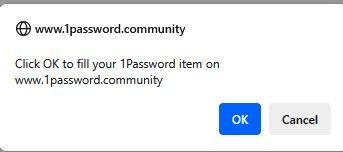
- 8 months ago
Hello Tyrone2! 👋
Thanks for the question. You can choose which items require confirmation before autofill by following these steps:
- Open your browser.
- Right-click on the 1Password icon in your browser's toolbar and click Settings.
- Click Security.
- Toggle the "Ask before filling" options as needed.
I hope that helps.-Dave

1P_Dave Moderator
8 months agoModeratorHello Tyrone2! 👋
Thanks for the question. You can choose which items require confirmation before autofill by following these steps:
- Open your browser.
- Right-click on the 1Password icon in your browser's toolbar and click Settings.
- Click Security.
- Toggle the "Ask before filling" options as needed.
I hope that helps.
-Dave


