Protect what matters – even after you're gone. Make a plan for your digital legacy today.
Forum Discussion

mhalano
8 months agoOccasional Contributor
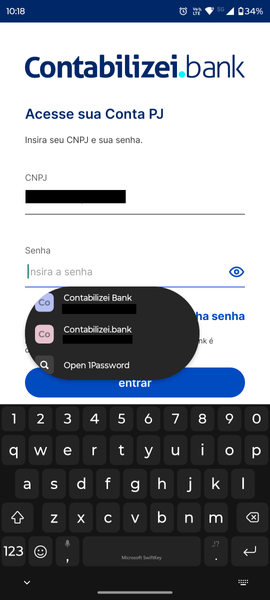
Strange visual for autofill floating box on Android 15
Hi!
I just got the update to Android 15 on my smartphone, a Motorola Edge 30 Ultra one, and I think the floating autofill box is quite strange, since it's cutting the icons on the left side.
Do y...

1P_Timothy Community Manager
8 months agoCommunity ManagerThanks for trying that out and reporting back mhalano.
About being round or square, I think that can be related to out-of-the-box customizations that Motorola does.
I think you're right here. If it is a visual modification from Motorola, we're likely limited in what can be changed on our end to fix it, though I can still flag this with the team. You could also consider reaching out to the Motorola team to let them know about this issue.
If you're not set on having autofill suggestions below fields, you can check if having the suggestions on the keyboard works better for you:
- Open and unlock 1Password.
- Tap the account or collection icon.
- Select Settings > Autofill.
- Tap "Display Autofill prompts" then select "Above supported keyboards".
Let us know how that goes, and thanks again!
mhalano
8 months agoOccasional Contributor
I will use the prompt above keyboard then, for now, at least. I hope you can center the elements. Maybe there are other vendors using a round box instead of a rectangular one.



