Our community is getting an upgrade on July 2nd! Learn more in the FAQs →
android
7 Topics
Quetta browser support?
Hi there, I am using https://play.google.com/store/apps/details?id=net.quetta.browser, which is also a Chromium browser. Autofill function works well, but passkeys are failed. "For security reasons, 1Password can not use this passkey. The associated URL for this passkey does not match the selected app". Version info: Quetta: 1.8.5(2815) 1passwd: 8.12.8-23.BETA(81208023)67Views1like1Comment
Expiration report
I'm using the date field (new) and the alert expiration. But there is no view or report to list by this fields. and no pop up or something to have visibility of alerts. That means I have to go one by one entry to see that field. My question is if there is a expiration or alert report and how to access this?87Views0likes3Comments
Support chromium-based browsers?
Hi, team! I'm working on an enterprise browser based on Android Chromium. When I try to save the passkeys using 1Password, I get an error message: "Unable to save passkey. For security reasons, 1Password did not save this passkey. The associated URL for this passkey does not match the selected app." I guess the reason of this error message might be because our browser (also chromium) isn't officially supported by 1Password. On other platforms, it seems there's the way to connect additional browsers to 1password app. Do you have any plan to support connecting non-supported browsers to 1Password app on Android? Thanks in advance!122Views0likes3CommentsManaged device, with work profile (Android/Zfold7)
I have just left my Samsung s10 for a Z Fold 7. On both phones I have 1Password installed under the Work Profile, they have the same configuration policies. On my ZFold I have to enter my password everything I open the app, biometrics are not working even though it is enabled on the phone. I can not enable Autofill, even though 1P is set to autofill in the phone setting. But on the work profile nothing happens. Please help167Views0likes3Comments
Removing slashes breaks URLs
Helping my father use his vault I manage for him. He had a website called https://rx.meijer.com/Landing/ and 1password kept get ridding of the trailing / character, and not just when viewing the record, and even after repeatedly editing the entry to confirm the / was there. We'd click the link, and the slash was not included when we opened the website from the 1password entry, breaking the website. Workarounds were using https://rx.meijer.com or https://rx.meiljer.com/Landing/#, but the trailing slash should only be removed if the domain has a slash with no characters after the slash.149Views0likes5Comments
Autofill "disabled" on Androids enrolled in Intune
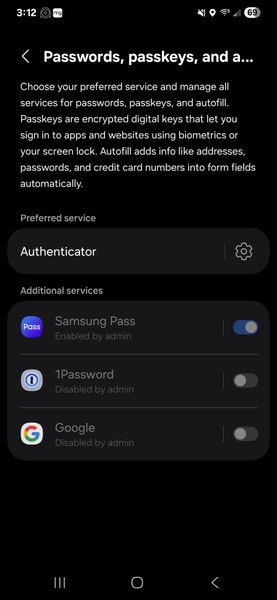
Hello - We recently converted our mobile fleet to Intune MDM. When trying to change the 1Password mobile app autofill options on any Android phone, it will display the various options like Authenticator, Google, 1Password, etc. But when I select 1Password, then go back a screen, it still says "none", and the selection doesn't stick. If I select one the does work, like Authenticator, then go back, I can see a list of apps that appear to be "disabled by Admin", including 1PW. But we didn't. And can't find anything, anywhere in Intune or 1PW admin where that is even an option. We believe we have it narrowed down to a Samsung/Android/Intune issue, but I wanted to put it out here and see if anyone else has experienced this. At this point, the app is useless, but there's got to be a solution somewhere out there. thx!478Views0likes1CommentProvide additional information on the Devices list
In light of email received regarding versions that will be considered deprecated effective May 1, it would be helpful if the Linked to your Account device list on the My Profile view included the version info. This would be helpful to both users and administrators alike.Solved192Views0likes3Comments