Level up your business security with free, on-demand training and certification. Explore 1Password Academy today →
authentication
65 Topics
Feature Request: Better security for MFA codes in records...
I posted this at 1Password at home, but I actually think this would be well suited for at home users or at work. So I post here as well - - Currently, storing both a password and its corresponding Multi-Factor Authentication (MFA/TOTP) seed within the same 1Password item creates a "single point of failure." If a device or 1Password session is left unlocked, an unauthorized user gains immediate access to both factors. I am requesting a feature that allows administrators (or individual users) to require a secondary validation (such as re-entering the Master Password, using Biometrics, or confirming a 1Password-level MFA prompt) before 1Password will reveal or autofill specific TOTP codes. The Problem While storing MFA codes in 1Password is incredibly convenient, it inherently violates the core principle of MFA (combining something you know with something you have). If an attacker gains access to the 1Password vault, the security benefit of MFA is effectively neutralized for that account. Proposed Solution Introduce a Step-Up Authentication / Conditional Access policy specifically for MFA fields. MFA Vault Lock: When a user attempts to copy, view, or autofill a TOTP code, 1Password should challenge the user for authentication. Customizable TTL (Time-to-Live): Users or admins should be able to configure how often this challenge occurs. Options could include: Every time the MFA code is accessed. Once per session / Once a day. After X minutes of inactivity. Administrative Control (1Password Business): Enforce this via Policies in the Admin Console, allowing organizations to mandate that all stored MFA codes require a secondary check, mitigating the risk of compromised employee endpoints. Use Case Example An employee opens a shared vault to log into a critical infrastructure tool. 1Password autofills the username and password normally. When the employee clicks the MFA field to copy the token, a biometrics prompt (Touch ID/Face ID) or a 1Password MFA prompt appears. Once validated, the token is revealed/filled, and the validation remains active for the next 8 hours (or whatever limit the admin set). Benefits Enhanced Security: Preserves the integrity of two-factor authentication even when stored in a single password manager. Enterprise Compliance: Helps businesses meet strict compliance frameworks (like SOC2 or ISO 27001) that frown upon storing passwords and MFA tokens together without isolating controls. User Flexibility: Maintains the convenience of 1Password's autofill while adding a vital speedbump for sensitive data.34Views0likes1Comment
Show the requested credential
I'm heavily using 1password now for agentic usage. All of my business is set up on it now, and all of my credentials are locally using op://, or service accounts. I've put in a lot of effort to try and isolate systems using least privilege, but one problem is that when agents (or applications) request a credential from the system, it doesn't say WHAT credential is being requested. Half the time it doesn't even say the correct name for the application making the request, either. This is a big problem, because I'm starting to get into the habit of just spamming "Accept" blindly. But the whole reason I have set up this whole pipeline is so I can catch malicious programs trying to gain access - for example, supply chain attack infections. Without seeing what credential is being requested, and the process information that is requesting it, I'm finding it's not actually adding much protection at all, because it's putting me into a false sense of security and promoting bad habits. If I'm running multiple agents in parallel, which is often the case, it might just say "Terminal requests access to your vault" or something similar. Which terminal is that? What is the underlying entity being requested? What credential? What is the process ID or terminal title, so I can isolate it to a terminal/agent? Etc. I think this is something that urgently needs to be added. Otherwise, as it stands, it's not really offering much protection because users will just go "oh, it's probably just that agent running - I'm sure it's fine" and accept everything. If that agent happened to have installed a malicious npm package, you'd probably catch it too late.43Views0likes3Commentsop from a remote docker container?
Hi, We're using (linux) ssh remotely to connect to an on-prem bastion. Behind the bastion is a docker container we use for ansible deployment. There are several playbooks that need environment variables exported in order to run. It would be nice to pull these in on the remote container using op instead of the current cut/paste workflow. Is it possible to authorize the terminal locally with op signin and then schmooze that authorization into the remote docker container with ssh -A or something to allow the container to do something like: TOKEN=$(op read "op://Dev Secrets/GitHub Token/password") ? Our 1P accounts are issued through an enterprise and we use SSO for login with our on-prem IDP so there may be some restrictions with methods available (eg: service account token)Solved46Views0likes1Comment
How to customize the suggested item name in the auto-save prompt?
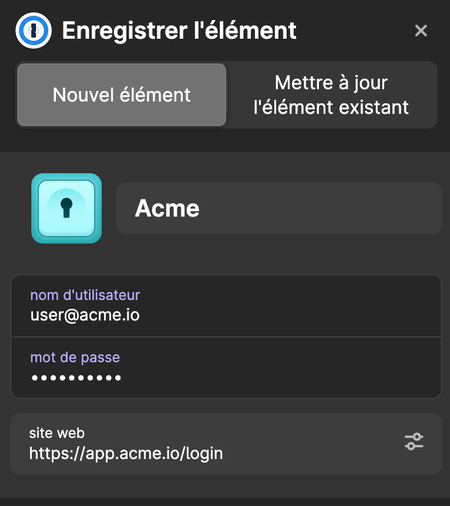
Hello. When a user saves a new login on our site (e.g. app.acme.io), the "Save in 1Password" prompt defaults to a name derived from the domain so we get "Acme" instead of "acme.io". It doesn't match our brand. We've already done what compatible-website-design recommends: brand-name <title>, application-name, apple-mobile-web-app-title, og:site_name, manifest.webmanifest (name / short_name), correct autocomplete attributes. None of these influence the suggested name. Questions: Is there a client-side mechanism (meta tag, well-known endpoint, JSON-LD…) we're missing to declare our brand name for the auto-save prompt? If not, what's the official process to submit a domain + brand name + logo to 1password Rich Icons / website database? Thanks.22Views0likes0Comments
Feature Request - Step Up Auth Geo-restrictions
We are starting to have more users working overseas temporarily from locations outside our usual allow list. We'd like a middle ground option to allow these locations but only with an additional authentication factor, or allow them for a small number of users.28Views0likes1Comment
Feature Request: Vault Level MFA Enforcement
Problem Statement Currently, MFA can be enforced at the account level, which applies universally to all vaults and users. While this provides a strong baseline, it lacks granularity for organizations that manage vaults with varying sensitivity levels. Not all vaults contain equally critical data, and enforcing MFA globally may introduce unnecessary friction for lower-risk use cases. Proposed Enhancement Introduce the capability to require MFA specifically for access to designated vaults. This would allow administrators to: Enforce MFA only when accessing high-sensitivity vaults (e.g., privileged credentials, production secrets, break glass) Maintain a more flexible user experience for lower-risk vaults Apply differentiated security policies aligned with data classification Suggested Functionality Admin-configurable MFA requirement at the vault level Conditional prompts: users authenticate with MFA only when accessing protected vaults Audit logging for vault-level MFA enforcement and access attempts Use Cases Segregation of privileged credentials requiring stronger authentication controls Compliance scenarios where specific data sets require step-up authentication Organizations implementing tiered security models across teams or environments Impact / Benefits Improved security posture through granular access controls Reduced user friction by avoiding blanket MFA enforcement Better alignment with enterprise security policies and compliance requirements Thank you for your consideration.Solved24Views0likes1CommentQuick Access Touch ID Mini-Blockade on MacBook Used In Desktop Mode
I have a paid 1Password subscription on another computer other than this forum account. I have a feature request to fix a 1Password user-experience inconsistency: 1. The Good Part first: First, let me introduce how I use 1password. Sometimes I enter the master password, but I also have let it use my biometric (Touch ID). Compare the bottom-right corner of these two screenshots: When using with MacBook open, Touch ID logo button shows: When using with MacBook closed (External Monitor), Touch ID logo button disappears: If I open/close MacBook, the bottom-right-corner button changes correctly when I open/close/open/close MacBook. Good, you did it properly in use case #1. This is great, because I can often open MacBook, do the TouchID thing, and close MacBook. I can even initiate by external keyboard (<TAB><TAB><ENTER> to select the TouchID dialog-button, before reaching my thumb over). This is without needing to use a mouse or touchscreen, if it's inconvenient to fully reach over to view my MacBook set aside during external KVM use. I can even use Touch ID without peeking at the MacBook (open lid only by 1-2" only to use Touch ID, tab, tab, enter on my external keyboard, then slip thumb briefly onto the touch ID). So this even works even if I can't currently see the MacBook screen because MacBook is oddly to the side and only slightly opened briefly only for TouchID use. (Due to desktop config with external display/accessories) So I am satisfied with this mode of operation -- It is convenient to Touch ID briefly even with my MacBook mostly closed. The problem arises with Quick Access (use case #2 below): 2. Problem #2: Quick Access Becomes Slow / Browser Autofill Inconvenient If I try to use either (A) Quick Access hotkey while in an external monitor use... or (B) try to use Browser Autofill. suddenly it's less convenient. This dialog appears: Since I'd rather not enter a long password every single time, I open the MacBook slightly, but it doesn't let me use Touch ID if the window is open before I re-open my MacBook (external monitor mode). Does not let me use Touch ID, even though Touch ID is enabled I have to manually re-close the 1Password dialog, then re-open it again in order to use Touch ID! How to reproduce: Use a closed Macbook in desktop mode (Connect to external monitor, keyboard, mouse. ) Use MacBook normally, while using external monitor/keyboard/mouse Now activate 1Password either via either Quick Access or Browser Autofill (same problem) It prompts you for 1password password Open your MacBook lid, intending to access the Touch ID Try to use Touch ID Try to get the dialog to let me use Touch ID It won't work You have to close the 1Password Quick Access dialog, and reopen it, to force it to let me use Touch ID. It's not necessary with the non-Quick-Access window (as seen in Item #1 near top), but necessary with the misnomer of a Quick Access window? And slows down Browser Autofill too. It unexpectedly turns the normal "Open 1Password" faster than "Open Quick Access" or "Autofill", because of this inconsistency during this use. Unlike the main 1Password login (which correctly detects laptop lid open/close properly), the other dialog (Quick Access / Browser Autofill) doesn't detect MacBook lid close/open events. Attention: 1Password Developer Team May someone at 1Password fix this "MacBook being used in desktop mode" usability inconsistency (#1 vs #2)? Bringing #2 into parity with #1, fixing the "Quick" in "Quick Access", and making browser autofill more convenient again.53Views0likes1Comment
System Down due to Expired Client Secret
I'm in desperate need of some support here. Our Notion alert that the client secret for our 1Password Entra ID SSO was expiring did not alert like it should have and we are now all locked out. There seems to be no way to bypass and use the emergency kit to update the integration in 1Password. I have opened a support ticket, but it isn't moving fast enough. Is there a way for Administrators to bypass SSO and get back in using the emergency kits that I'm missing?52Views0likes0Comments
Barracuda Networks
1Password will not autofill the one-time password for the Barracuda login page for BarracudaNetworks.com. It works with your username and password fine, but the multi-factor authentication must be manually dragged or copy and pasted into the website field. I found posts about other Barracuda sites having the exact same issue on here dated 3 years ago. Has any progress been made by any chance at fixing this? Barracuda is quite a popular site in the world of IT. Thank you.Solved77Views0likes5Comments