Our community is getting an upgrade on July 2nd! Learn more in the FAQs →
browser extension
6855 Topics
Cannot use 1P for passkeys in Google OICD login flow
This is a tricky one to explain but I've run into this problem a couple of times. I did not take any screenshots and subsequent repro attempts have failed because my login hits a fast path and I don't see any web UI. My Google Account has a passkey on it. When a particular Mac App (NetNewsWire) opens a browser window to initiate a Google Account login, the window has no UI other than the location bar. This is important. When I get to the screen in the GA login flow where it asks for my passkey it gives me two options to source my passkey from, neither of which allow me to pick 1P. And because there is no other browser UI in the pop-up window, there is no 1P extension icon to interact with. I tried using the 1P Quick Access app but it didn't register what was happening. I have to use another login method (secure code, backup code etc) to successfully complete the login flow. It is a process of trial-and-error and I'm concerned my activity looks suspicious and will result in an account lockout. Does anyone have suggestions on how to fix this?8Views0likes1CommentAutofill Forms- Resumé Autofill
Note, this is mostly for Workday and their horrible resume parsing tool. I've been applying for a new job—a lot (not AI, I actually like m dashes). Looks like most employers use Workday for the application process. For each application I have to upload a resume and then Workday attempts to parse it out in their forms fill section. Rarely works. Line breaks are weird, job descriptions filled in for the wrong job, etc. I would love the option to create a form fill for situations especially like this. Enter in resume details one using the workday form field titles and then have 1P fill it all in. There are chrome and Firefox extensions for this, but most have no ratings and need a lot of access to your info. I've come to trust 1P and would love to use it for more things. Thanks!80Views2likes5CommentsDisable 1Password for Specific Websites
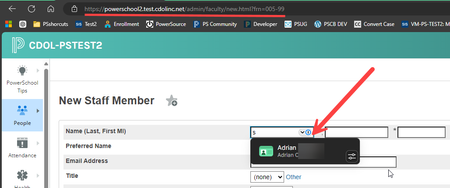
I am the School Information Systems Manager for a district overseeing 30 schools. As part of my responsibilities, I frequently create new staff and student accounts in our Student Information System (SIS). However, I’ve encountered an issue where 1Password's Account Autofill and password generation features interfere with the account creation process. Specifically, the Autofill pop-up often appears when I proceed to the next step, and if clicked accidentally, it replaces all of the entered information with my own credentials. I’ve tried using the "Hide on this page" option within 1Password, which resolves the issue temporarily. However, since each user account URL in the SIS is unique due to URL parameters, the pop-ups reappear when I create a new account. As a result, the "Hide on this page" feature isn’t effective across different accounts. I would like to continue using 1Password for other websites, but I need to completely disable it for the domain of my SIS. Ideally, I’d like to define certain domains where 1Password is disabled. For example, disabling it for all URLs beginning with https://powerschool.cdolinc.net/. Is this configuration possible? Is this possible? 1Password Version: Windows 8.10.45 Extension Version: 8.10.46.26 OS Version: Windows Browser: Edge516Views2likes3Comments
Missing add browser button
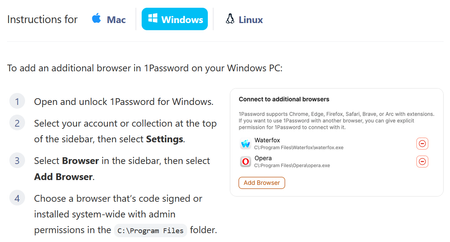
Apparently, to add an unsupported browser, I can click "Add Browser". But there is no "Add Browser" button: The log file goes on an on about "Verifying browser", followed by, "Additional error context: Process is not cmd.exe" It does note that the browser is signed by OSSign, which is correct for Librewolf, and it is looking at the correct copy of librewolf.exe. The parent process of that being cmd.exe is up to Microsoft. I would think that since I've clicked on it, the parent process would be explorer.exe in the normal case. I did try launching a cmd.exe terminal window and running librewolf from there, but that did not help.Solved219Views0likes22Comments
Not understanding Win Hello lately
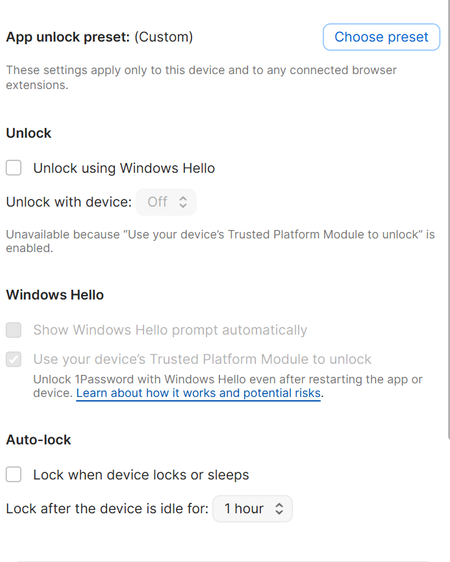
I always was able to get Windows Hello to open instead of asking for my 1PW password first. It takes some time and it used to be hidden. Now it never opens up, I always have to use the 1PW password and it is two issues to me. My 1PW password is really long, but more so, what is the big deal with Windows Hello if I am forced to enter my other PW all the time. Eventually Windows Hello appears, but no need. Aggravating. Has something changed?49Views0likes4Comments
Constantly Asking Me To Login
Apologies if this has asked and answered. I signed up 1Password a few months ago, as recommended I created an extremely complex password. However I use 3 computers and whatever I settings I choose they are constantly asking me to login, browser, desktop, at least once a day, at least once after a reboot. It's started to drive me nuts and I have had to write down my password. I've tried a lot of options but here are my PC settings on the current PC Browser Settings Thanks, apologies for being so frustrated28Views0likes1Comment
Firefox Relay Integration with 1Password
The title pretty much says it all. It would be great to see 1Password integrate with Firefox Relay in the same way that it already does with Fastmail to be able to generate and save email masks for new logins seamlessly. Not sure how much would go into that, but I hope I'm not alone in that want! 1Password Version: Not Provided Extension Version: Not Provided OS Version: Not Provided Browser:_ Not Provided1.6KViews8likes37CommentsHelium Browser rejected by 1Password BrowserSupport with browser mismatch
Hi, I’m trying to use the 1Password extension in Helium Browser on Windows 11, but it won’t connect to the 1Password desktop app. The extension shows “Integration status: Connection problem” even when the desktop app is unlocked. Details: Windows 11 Pro 25H2, build 26200.8655 1Password for Windows 8.12.22 Helium 0.13.3.1 1Password extension ID: aeblfdkhhhdcdjpifhhbdiojplfjncoa Helium path: C:\Program Files\imput\Helium\Application\chrome.exe Helium publisher: imput LLC Relevant BrowserSupport log: Verifying browser "C:\Program Files\imput\Helium\Application\chrome.exe" name: chrome, publisher: imput LLC, version: 0.13.3.1 Browser support error: BrowserVerificationFail Additional error context: browser mismatch I reported this to Helium here: https://github.com/imputnet/helium-windows/issues/293 Their maintainer closed it as not planned and said this should be reported to 1Password. They also confirmed Helium’s executable is named chrome.exe for historical reasons, though changing that would require investigation on their side. In 1Password, Settings → Browser does not show an Add Browser option, so I can’t manually trust Helium. Is there a supported way to add/trust this browser, or is the chrome.exe + imput LLC publisher combination currently blocked by 1Password’s browser verification?37Views0likes1Comment