Our community is getting an upgrade on July 2nd! Learn more in the FAQs →
browser extension
6855 Topics
Support for Zen browser
Hi! There's this new browser called "Zen browser" It's based on Firefox but the 1password extension doesn't work with the desktop app 1Password Version: Not Provided Extension Version: Not Provided OS Version: Not Provided Browser: Not ProvidedSolved21KViews56likes183Comments
Native Password AutoFill Extension macOS
So one of the people in my family subscription for 1P relies heavily on iCloud Keychain. The nice piece about using the native autofill extension is entries from both show up together in-line. This happens on iOS (or if you use other password managers it secure by each provider but both are offered the same way together). in terms of migration and allowing those who wish to use both depending on the context. It would be nice to support the native autofill extension, but further it limits exposure or need for safari extension. Should someone not want to use or can't install the extension due to work policy or just rather not use safari extensions thanks. 1Password Version: 8.x Extension Version: Not Provided OS Version: macOS 12.6 Browser:_ SafariSolved11KViews19likes260Comments
Trusted Browser Support - Windows
Good Day! Is there any word on when trusted browser support will be available for the Windows version? I am using Floorp as my browser (I wanted a Firefox/Gecko based browser that supports Workspaces) but the Desktop app doesn't integrate with Floorp, nor is there any way to add it as a trusted browser. It appears this feature to add a trusted browser is only available for Mac, so I am curious when it will be made available for Windows as well? 1Password Version: 8.10.26 Extension Version: 2.15.1 OS Version: Windows 11 Browser: FloorpSolved5.6KViews18likes74Comments
1Password Chrome extension is incorrectly manipulating <code> blocks
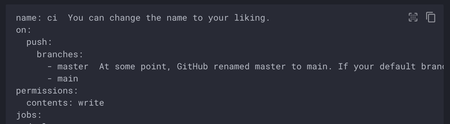
The latest 1Password Chrome extension is incorrectly manipulating the DOM within <code> blocks on static pages. It looks it's using prism.js to try to add syntax highlighting to <code> blocks on the entire page. If you're using a static site generator to highlight code with a different library, it causes the display to break. Example: mkdocs, a popular documentation tool If you view the documentation for customizing Mkdocs material (https://squidfunk.github.io/mkdocs-material/customization/) with the extension enabled, you'll see that the YAML example at the top is not highlighted (it should be). Under the hood, if you inspect its DOM, you can see that it's been rewritten with prismjs classes. If you disable the extension, it is highlighted: This is likely to impact a number of documentation sites in the tech community.Solved12KViews18likes54Comments
Has something changed: http:// not filling in any more?
For passwords I have that are specifically http:// like on my own Lan, these aren't being suggested any more by 1Password extension in Brave. Anything https:// is working. And yes I have http:// set as the Website address. I'm sure this was working until very recently.Solved4.4KViews18likes49Comments
New Feature "Expiry date" - Where is the alert?
I would like to know if I just don't understand it or if it doesn't work. I have added a date to an item and set an alarm for the day before. But no alarm appears on the day of the alarm?! I can only see that the item is expiring or about to expire when I navigate to the item itself or look in the watchtower. However, I understand "alert" to mean something else. My expectation is that there is either a notification from 1Password or I at least get some kind of indication on the main screen, e.g. a newly introduced category "expired" with a red 1 on it or something. Is there anything else planned, as I don't find it very helpful as it is now.Solved4.3KViews13likes39Comments
Wildcard implementation in website property of Login Item
website property inside 1Password Login Item is a great feature which helps to automatically detect and auto fill username and password into the form fields. What's great about it and what's already implemented: You can actually create multiple website properties and still any of the matching websites will work You can set the domain to the website property and any subdomain of that domain will work You can set the domain to the website property and any subdirectory of that domain will work However I can give an example from https://www.netlify.com/ (web deployment platform) which won't match with any of the above 3 features. Let's assume I am developing web application and I set my application url as https://some-app.netlify.app. Netlify has a greate feature to customize subdomains based on the different deployment strategies. For example if I am now working on new github branch and I create a PR #100, then Netlify automatically creates new deployment url https://deploy-preview-129--some-app.netlify.app which is not just a subdomain of netlify.app because there can be thousands of app in netlify, however this is slightly different customized subdomain of netlify with some predefined prefix. So what I would I like is implementation of some custom wildcard options for the subdomains like *sub.domain.com where I can have potentially anything in the place of wildcard *. 1Password Version: Not Provided Extension Version: Not Provided OS Version: Not Provided Browser: Not Provided2.4KViews12likes16CommentsWindows Hello opens in background and doesn't function correctly
The last 3 days windows hello (in use with 1 password) doesn't accept input. And somehow caps lock is on even though the keyboard doesn't show it on. I saw that this was an issue a year ago, but it just occurred again with my system. I am on Win 11, with the latest updates, no VPN, using Chrome with the browser extension. I then get repeated requested to enter my full 1Password credentials. However after an hour, the timeout for 1Password, the same problem occurs. I have tried un enabling and then re enabling 1Password, to no effect. I also rebooted and then ran a full Microsoft Virus scan, but nothing was found.Solved2.1KViews12likes71CommentsmacOS: After Updating to 1Password for Safari 8.12.4 autofill for many sites no longer works
Including 1Password Communities! This seems like a major faux-pas (everything was working fine before the update). Autofill still works on some sites. macSO 26.3 with Safari 26.3. 1Password 8.12.5, 1Password for Safari 8.12.4.Solved1.5KViews11likes55Comments