Our community is getting an upgrade on July 2nd! Learn more in the FAQs →
family
145 Topics
Feature Request: Show Original Contributor of Items in Shared Family Vaults
Summary Please add a built-in way to display who originally created or contributed an item to a shared vault in 1Password Family. Problem In shared family vaults, it is currently not possible to see who an item originally belongs to once it has been shared. This makes it unclear who owns a specific account, even though the item is visible to everyone in the family. As a workaround, we manually add tags with the name of the person who created or contributed the item. This allows sorting and filtering by owner, but it is manual, error-prone, and easy to forget. Proposed Feature Display non-editable metadata such as: “Contributed by: Name” or “Original owner: Name” This information should remain visible in the item details after sharing or moving an item into a shared family vault. Benefit This makes it easy to understand who an account actually belongs to, even when it is shared for convenience. It improves clarity in family vaults, avoids confusion, and removes the need for manual tagging. Reference Apple Passwords already shows this information for shared items using labels like “Contributed by: Name”, which provides clear ownership at a glance.135Views4likes5Comments
How to Migrate 1Password Vaults to Bitwarden Folders (With Passkeys!) using iOS 26 CXP
I just finished migrating my credentials from 1Password to a fresh Bitwarden setup, and I wanted to share a workaround for a major pain point regarding vault organization and Passkeys. Those who used 1Password v7 will remember that exporting by vault was standard. In v8, this has been reduced to an "all-at-once" account export. If you want to maintain your organization during a move, this creates a mess. The Challenge: Maintaining Structure If you have multiple vaults (Work, Personal, Shared, etc.) and want them to land in specific Bitwarden Folders, an "all-at-once" export creates a massive, unorganized pile. Plus, standard file exports (CSV/1PUX) usually break Passkeys. The Solution: The "Single-Vault Pipeline" (iOS 26 CXP) By using the newly introduced Credential Exchange Protocol (CXP) on iOS 26, you can move your data app-to-app, vault-by-vault, and keep your Passkeys intact. (Note: I used a 1Password Family account and a free Bitwarden account for this). The Migration Manual: Prep 1Password (Web Browser) Log into 1Password.com on a desktop. Go to Manage Account > People > Select your account > Manage Vaults. The Trick: Deselect all vaults until only one is left visible to your user. Now, your mobile app will only "see" that specific vault. The CXP Transfer (iOS Device) Open the 1Password app on your iPhone/iPad. Navigate to Settings > Advanced > Start Export. Enter your account name (there is a hint at the bottom) and approve. Select Bitwarden as the destination. It will open Bitwarden and securely transfer everything from that one visible vault—including Passkeys and TOTP seeds. Assign to Folders (Bitwarden Desktop) Open the Bitwarden Web Vault on your computer. Click on "No Folder" (this shows all the items you just imported that don't have a folder assignment). Click the "Select All" checkbox at the top. Click the three dots (⋮) above the list > Add to Folder. (Note: You’ll need to create the folder first by pressing the + New button). Rinse and Repeat Go back to the 1Password web interface. Deselect the vault you just finished and select the next one. Repeat the iOS export. Because Bitwarden treats these as new "unassigned" items, you can neatly move the next batch into the correct folder. Why this is the optimal way: Passkeys & 2FA: Unlike file exports, CXP moves the actual cryptographic keys for Passkeys and your TOTP seeds. Shared Protocol: Because it uses a modern exchange protocol, misc info and custom fields transfer much more accurately than a messy CSV. Organization: You don't have to manually sort 1,000 items at once. You do it in controlled, vault-to-folder chunks. Hope this helps someone else stuck in the migration process!820Views2likes5Comments
👉 Please allow permanent sort by Title in 1Password for Windows
Hello 1Password team, since a few updates on 1Password for Windows, the sort order (for example "Title") is no longer remembered when switching categories or after restarting the app. This makes it cumbersome to work with large vaults, because I always have to re-set "Sort by Title" every time I open the app or change the view. It would be very helpful to have: - either a global default sort option (e.g. always by Title), - or that 1Password simply remembers the last chosen sort order reliably. Is this planned, or could you please consider adding it? Thank you!Solved280Views2likes12Comments
Medical and RX ID Cards
It would be real nice if 1Password could store Medical and Prescription ID Card details. I did a search and it was recommended to use the Medical record, but that is more for hospital and medication records. It doesn't align with anything for your ID cards. Almost like it would be better to do a regular note record instead. I've seen some other records that most people (for family) will never use (Database). But most everyone has a medical ID and prescription card. How to recommend/suggest a new record type?367Views2likes4CommentsDocument Storage
The website says 1Password allows 1GB per person for non-business account document storage, but I have no way to check how much storage I have left for my account. Please add the feature to see how much storage I have left, and the ability to buy more storage if needed. 1 GB is nothing nowadays.87Views2likes1Comment
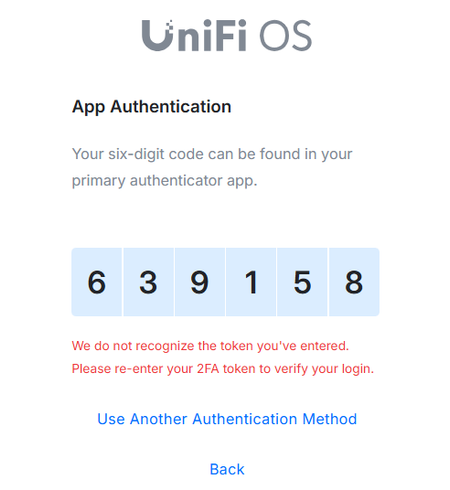
UniFi 2FA Automatic Filling Fail
Hello, I did some research and found people with the same issues but couldn't resolve my problem. Basically, when I log in to UniFi, the autofill works as expected BUT the 2FA is not working. If I copy and paste the code, then it works. Anybody dealing with the same issue? I tried deleting all the browser hostory including literally everything but it does not work. I have the same issue with Chrome and Edge. I have attached the printscreen. It used to work before but for some reason stopped a few weeks ago. Any input would be appreciated. Thank you!170Views1like10Comments
Switching to CAD billing
I started using 1password sometime in the last decade, when it was only offered in USD. Now that there is an offer in Canadian dollars, I'd like to switch to that. Is there an easier way than to create a new account and copy all items to the new account. This is a family account, and I really don't relish copying to new accounts for 5 people.90Views1like10Comments
+1 to Insurance Category
I see a post from FOUR YEARS ago asking for an insurance category. This seems like a no brainer/layup to add. Let me put it in developer terms: As a user, I want to add insurance policy information to a vault so that I can easily track and reference all my insurance policies information. The data should include: type; provider, policy number, coverage types, coverage amounts, deductible amounts, company contact information, claims address and phone number, effective dates, plus whatever else people can think of. Thank you.27Views1like1Comment
Secure Notes Problem
Hello I have a problem editing and displaying secure notes which I think is a "known", but unacceptable, problem with 1Password. I have sent the request below to the support team and I will let you know how I get on but if anyone has similar problems, or even a solution, I'd really like to know. Many thanks, Q Hello I have recently migrated from LastPass and I'm glad I did, however... I am hitting a problem editing and displaying secure notes, the application is stated as being Markdown friendly and I use either Markdown or plain text, nothing fancy so there should not be a problem. If I put some text into a secure note it MAY OR MAY NOT display properly. Frequently a note will appear truncated, but not consistently. I am using 1PWD on macOS Tahoe 26.2 and an iPhone 16 Pro Max running iOS 26.1 so nothing ancient and there really shouldn't be a problem displaying simple .md or .txt material, but there is. I believe from the 1PWD Community postings that this is a "known" issue and if this is the case please advise me when it is going to be resolved because as it stands the application does not do what it says it will or what it should do. To be able to properly and reliably display simple text files is a core function.79Views1like1Comment