Level up your business security with free, on-demand training and certification. Explore 1Password Academy today →
feature request
569 Topics
Please, please, could you separate these options?
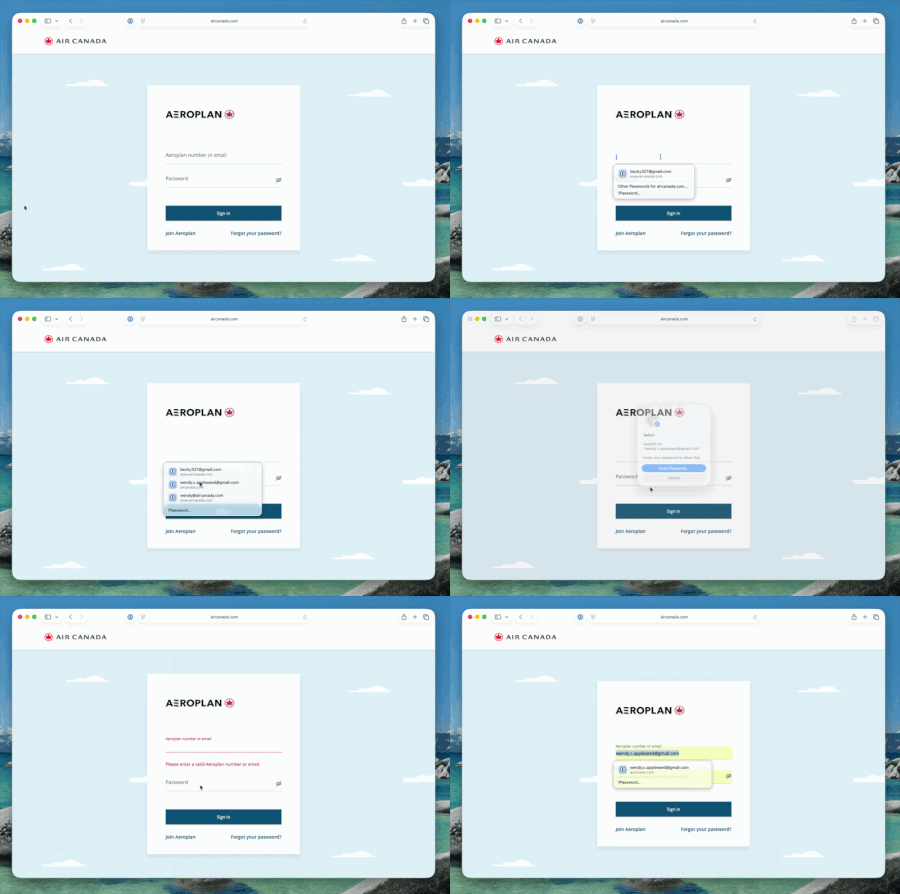
I would like to reiterate alexgreyhead’s suggestion in https://www.1password.community/discussions/1password/chrome-extension-resetting-autofill-settings-to-full-annoyance-mode---every-day-/32711 that the options to fill and save passwords be separate, but for the reason opposite to the one he/she gave. Alex “would prefer just to be able to tick "Offer to save passwords" and leave the rest to him/her to do manually.” I, on the other hand, would like 1Password to offer to fill passwords and leave the saving of updates to me. The reason why, in a nutshell: I’m a QA tester for a suite of software applications. For one of these applications, I have over 75 accounts across my company’s more than half a dozen environments. I have to reset the passwords for all 75+ every three months. For some reason, 1Password lumps all of my accounts from Environments A and B (67 total accounts) together whenever it offers them for selection on login or when changing a password. Many of the accounts in Environment B mirror those in Environment A, so my usernames between the two are very similar. (It also lumps my accounts for Environments C and D together, but there isn’t as much similarity in the usernames across those two environments.) So, if I choose to make use of the option to update an existing password—which is given five times during the password update process for each account—for an Environment A or B account, I have to be VERY careful to choose the right one. If I accidentally save a password to the wrong account in 1Password, I have to go through an even lengthier and more painful process that makes me kind of grouchy to even think about, to fix the situation. This is why I prefer to update each password directly in 1Password. In addition, three out of the five times the option is given to save a new password, the dropdown/modal covers up the control that I want to use next. So I have to either move my left hand from the Ctrl+C/V position to press the Tab key, or perform an extra mouse click, more than 225 times during this already tedious process, when I’m just trying to get all these accounts updated as efficiently as possible. Could you help a girl out?19Views1like0CommentsmacOS AutoFill is now in public beta!
Hey everyone! We're excited to share that native macOS AutoFill is now available in public beta for 1Password. This has been one of the most requested features for years, and we're now at a point where you can test it out and give us feedback! What's new in beta: By adopting Apple's Passwords API, 1Password functions as a native Credential Provider on macOS for logins. You can view autofill suggestions directly within Safari and other supported desktop apps. Passkey support is included in this beta as well. Fill, create and update passkeys easily through macOS autofill. The 1Password Safari extension can be used alongside macOS AutoFill to access additional features not currently supported by the Passwords API. Coming later in Beta, you can set up one time codes using the same integration. How to try it: Update to 1Password for macOS 8.12.22 or later from the beta channel. Make sure you’re on macOS 14 (Sonoma) or later on Apple silicon. Go to 1Password for Mac Settings > Autofill > Set up macOS AutoFill, then select "Turn On" from the macOS permission prompt. You'll see "Active" status once it's enabled. Try filling logins and passkeys and let us know how it goes! We're happy to be one of the first credential managers to adopt these APIs and we want to get it right for you. Drop your feedback in the comments below!423Views1like15Comments
I Generate my 1pw Password by misstake
I am facing a issue accessing my personal account. By mistake, I changed my account password using the password generator inside the app, which logged me out of all devices. Currently, I do not have the new password or the recovery code, but I do have my Secret Key and my Emergency Kit. This account contains all of my important email and service passwords, so losing access is a major problem. Could you please advise me on the official steps I can take to restore access, or confirm if there are any recovery options available given that I have the Emergency Kit and Secret Key? I’ve tried every possible method, but unfortunately I still can’t access my 1Password account. I don’t have the Recovery Code, and I logged out of my phone because it was asking for the new password that was generated through your app and saved inside it — which I can no longer access. I’m fine with deleting the account. However, I want to keep the subscription I already paid for on my old account and have it transferred to the new one after deletion. Thank you very much for your support.33Views0likes1Comment
Merging Duplicates
I know that the general response is to manually do this, but doing this with 1000+ objects is impractical to say the least. Some were created because when I migrated to 1Password, some duplicate/corrupt entries already existed in my profiles on Avast, Google, etc, which I did not notice at the time. Unfortunately, some have been created since then by either less tech-savvy family members on their own accounts or how 1Password is asking more often regarding site/app trust & permissions ("Allow fill once") and is thus creating duplicates of its own accord. The fact that merging wasn't already added a while back, considering how many people have asked about it over the years, is interesting to say the least. And yes, I have been attempting to create my own tool for quite some time, but it is difficult to find time to work on it lately, on top of not being successful in general.148Views1like4Comments
Alphabet index when viewing All Items
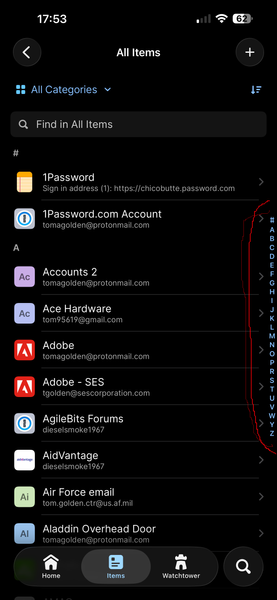
Not sure exactly how to describe what I am talking about in words, so have attached a picture from my iOS 1Password app (see right hand edge, area in red circle). Several years ago, this "alphabet" on the side of the All Items view was available in the desktop app, but has been missing for a long time. I am unable to find it in any Settings. This is extremely helpful to jump right to the general part of my 300+ item long vault. Is this still available in the desktop app, or can it be brought back? Thank you31Views0likes3CommentsFeature Request - Send me a password securely
I had a look for this feature request and couldnt see it... I would like the ability for people that dont have 1password to share passwords securely with me. Perhaps I could send them a link to an empty 1Password item which they can then update, hit save and I get the password securely in my vault. Links expire within x days, and can only be saved once. Once its saved, the link expires immediately and the person who updated it cannot access it.Solved2.2KViews9likes26CommentsPlease make the system tray icon customizable to comply with OS design standards (monochrome)
1Password has been flip-flopping between colorful and monochrome system tray icons and is now in an inconsistent state across operating systems. Please let us select between the colorful icon and the monochrome one. By catering to one set of users, you have isolated others. Your "evolving our design language across 1Password to create a more consistent experience." reasoning is flawed by the mere fact that you do not have a consistent design across OSes. A more "cohesive and predictable experience" would be an app that actually looks like it belongs in the OS you are using, rather than standing out as the sole exception. Regarding consistency, on MacOS, you follow the OS standard of a monochrome tray icon which looks native: But on Linux and Windows, we are forced to use the colorful option, which at least on KDE does not align with the design standards. Frankly the colorful icon does not comply with Windows design standards either: While we're on the topic of native integration, the Safari plugin also ditches the native monochrome icon, again diverting from OS design standards, which was a strange decision considering it used to be compliant on older versions: Current: Compliant: This was the behavior of 1Password 7, but ever since 8 you have forced the full color icon down our throats, design guidelines be damned. This was brought up years ago, but for some reason my account was deactivated, so my comment is now marked as "anonymous". Choices are good, for those who would rather focus on visibility they can opt-in to the color icon, for those who prefer consistent design, the monochrome icon should be available - arguably by default.34Views0likes1Comment
Please update the Windows Tray Icon
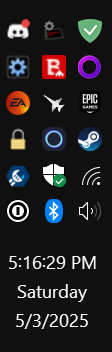
The black and white icon used in the system tray for Windows is very challenging to see, particularly in dark mode. It's basically monochrome and blends in with other system icons like wifi or sound settings. See attached for an example. Note the lack of color or any other clear identity/definition, particularly in Dark Mode. It is lost in a sea of other icons. I have been waiting for this to change for literally years. The old blue icon was great and very easy to spot. The new one annoys me every time I have to hunt to find it. I am begging you to please, please change the icon to at least match the one used literally everywhere else like in browser extensions or phone apps., Current Version: 1Password for Windows 8.10.75 (81075001)317Views0likes11Comments