Our community is getting an upgrade on July 2nd! Learn more in the FAQs →
microsoft entra
28 Topics
Improve speed of login - Feature Request
Howdy all, As someone that has multiple SSO accounts on my machine (for various different purposes) one thing that has always added an extra step for my team, myself, and various users across our business, is that they have to click to select which SSO account they wish to log in with after clicking to SSO. We particularly use Entra SSO (so unsure if there is something similar for other providers) but would love to see 1Password leverage the login_hint parameter as described here https://learn.microsoft.com/en-us/entra/identity/hybrid/connect/how-to-connect-sso This would mean that when you press to SSO with Microsoft, it would pass the login_hint parameter with the SSO username over, so if you have multiple logged in accounts, it will auto-pick the correct one. In theory a REALLY simple fix, but would save an extra click for every SSO sign in for affected users. Looks with big round puppydog eyes. Cheers, Stuart76Views2likes1Comment
Microsoft Entra ID SSO issue
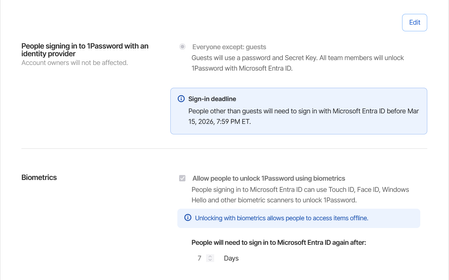
We have recently migrated all our users over to using Microsoft Entra ID SSO. It works fine except every time they close the app or shutdown their computer, it asks them to login using SSO. We have a set of employees who do not always have a connection available. They go from site to site and some basements where they need to go don't have network or wi-fi. When that happens, they are unable to use 1password. Keep in mind that most of the time when they access these places they are escorted by security to go down in the basements and it's wasting their time as well as the security employee. We have it set to ask the Entra password every 7 days. Expected behavior: if I close the app or restart the computer, the token should still be valid. Current behavior: Every time I close the app or restart the computer, I have to login to the microsoft account again.148Views1like1Comment
User unable to log in with SSO
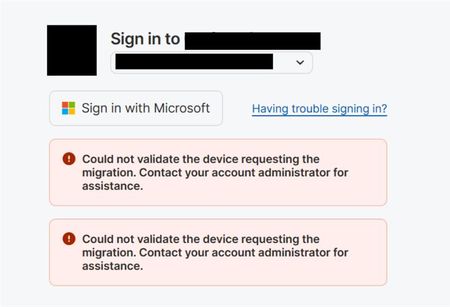
I have a user who we have been unable to sign in no matter what we attempt. signing in, password recovery, all of it seems to fail. the user's email address was changed a few months ago and 1password was working just fine, but the moment we attempted to sign into a new device everything seemed to stop working, and now it even broke on the original device. In attempting account recovery, the user receives errors. there seems to be nothing we can do to get into this account, anyone have ideas? This is an existing user with a large password vault. Attempted Account Recovery but it fails Attempted to update "Primary email address" field for the user on the Identity provider and that did not help Attempted to recreate the original user account username, and that also fails Support is unresponsive73Views1like2Comments