Our community is getting an upgrade on July 2nd! Learn more in the FAQs →
microsoft entra
28 Topics
Autofill "disabled" on Androids enrolled in Intune
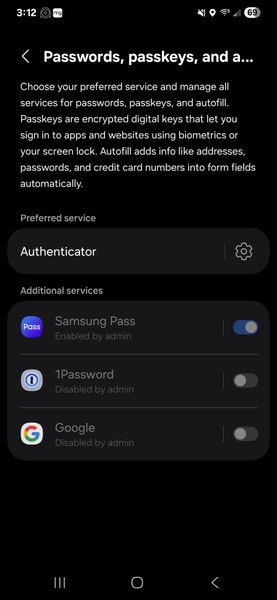
Hello - We recently converted our mobile fleet to Intune MDM. When trying to change the 1Password mobile app autofill options on any Android phone, it will display the various options like Authenticator, Google, 1Password, etc. But when I select 1Password, then go back a screen, it still says "none", and the selection doesn't stick. If I select one the does work, like Authenticator, then go back, I can see a list of apps that appear to be "disabled by Admin", including 1PW. But we didn't. And can't find anything, anywhere in Intune or 1PW admin where that is even an option. We believe we have it narrowed down to a Samsung/Android/Intune issue, but I wanted to put it out here and see if anyone else has experienced this. At this point, the app is useless, but there's got to be a solution somewhere out there. thx!454Views0likes1Comment
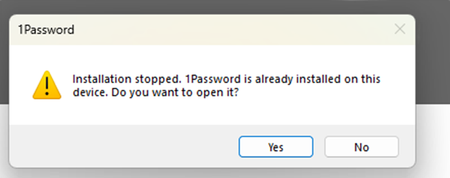
"Installation stopped. 1Password is already installed on this device" Notification
Good morning, Multiple users, including myself, are receiving this error: After clicking, "Yes" the pop-up will come back sometime later. We are deploying 1Password via Intune (Windows Store App). How can I get this pop-up to go away?Solved400Views0likes10Comments
Assistance Needed: Users Unable to Access 1Password After Sign-In Method Change
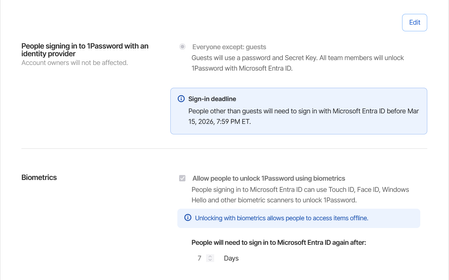
We recently switched our sign-in method to Microsoft, but several users did not complete the 1Password setup process within the 30-day window and are now unable to log in. Performing an account recovery doesn't work. What is the recommended process to resolve this and restore their access?144Views0likes5Comments
Microsoft Entra ID SSO issue
We have recently migrated all our users over to using Microsoft Entra ID SSO. It works fine except every time they close the app or shutdown their computer, it asks them to login using SSO. We have a set of employees who do not always have a connection available. They go from site to site and some basements where they need to go don't have network or wi-fi. When that happens, they are unable to use 1password. Keep in mind that most of the time when they access these places they are escorted by security to go down in the basements and it's wasting their time as well as the security employee. We have it set to ask the Entra password every 7 days. Expected behavior: if I close the app or restart the computer, the token should still be valid. Current behavior: Every time I close the app or restart the computer, I have to login to the microsoft account again.101Views1like1Comment
Chrome passkey popup
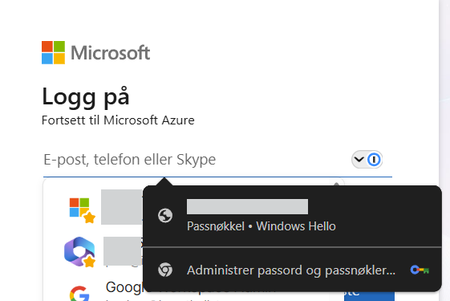
I have this issue where Chrome's passkey popup overlays 1Password. The device is Entra joined and the passkey is bound to the device. Deleting the passkey in Windows settings is not an option. Everytime i visit a Microsoft login page the Chrome passkey popup also shows over 1Password. This only happens when using Windows 11 + Chrome. Using Windows 11 + Microsoft Edge does not show any popup from MS. 1Password is set as the default password manager in Chrome Any recommendations? 1Password Version: 8.12.10 Extension Version: 8.12.12.44 OS Version: Windows 11 25H2 | 26200.8246 Browser: Chrome 124.0.7444.163Solved99Views0likes3CommentsManaged Update of Intune Win32 App
I deploy 1Password via Intune, and I recently transitioned our deployment from the MSI installer to the MSIX installer—as a Win32 app in both cases. I prefer to manage the deployed version and so disable Auto Update. When deploying using the MSI installer, I used a File detection rule that checked for the presence of the app and also checked the version. Rule type: File Path: C:\Program Files\1Password\app\8 File or folder: 1Password.exe Detection method: String (version) Operator: Greater than or equal to Value: 8.x.x Associated with a 32-bit app on 64-bit clients: No With this process, when I updated the installer version, I would update the version value in the detection rule, and Intune would update the installed version of 1Password when it detected a version number less than the expected value. Because the detection script provided for the MSIX deployment—AppDetectScript.ps1—does not include a version check, updating the installer version has no effect on devices where 1Password is already installed. Intune will report that the latest version is installed, but that is only because it is finding 1Password, not because it is finding the latest version of 1Password. I modified the script to include a version check, in hopes that that Intune would then behave as it had with the MSI installer, installing the latest version of the app when it detected that the installed version did not match the target version. # Modify the $targetVersion to ensure app updates $targetVersion = "8.12.10" $targetVersion = [Version] $targetVersion.ToString() # The unique 1Password identifier in detection scripts. $targetPackageFamilyName = "Agilebits.1Password_amwd9z03whsfe" try { # Per-user install (eg. Install behavior in Intune is User). $package = Get-AppxPackage | Where-Object { $_.PackageFamilyName -eq $targetPackageFamilyName } if ($package) { $ver = [Version] $package.Version.ToString() Write-Host "1Password is installed." if ($ver -ge $targetVersion) { Write-Host "1Password is up to date." exit 0 } else { Write-Host "1Password requires an update." exit 1 } } else { Write-Host "A 1Password installation wasn't found." exit 1 } } catch { Write-Host "An error occurred when detecting a 1Password installation: $_" exit 1 } As far as I can tell, the detection script worked, in the sense that it started registering the app as not installed—"The application was not detected after installation completed successfully"—but it did not cause the installed version to be updated. I know that the https://support.1password.com/deploy-1password/?windows#step-1-plan-your-deployment-windows states: To allow your team members to update 1Password, deploy the MSIX as a Win32 app and set the install behavior to User. To manage and deploy updates to 1Password, deploy the MSIX as a line-of-business app and set the install behavior to User. But all of our other Intune app deployments are Win32 apps, and, https://learn.microsoft.com/en-us/intune/intune-service/apps/apps-win32-troubleshoot#:~:text=If%20you%20mix%20the%20installation%20of%20Win32%20apps%20and%20line%2Dof%2Dbusiness%20(LOB)%20apps%20during%20Windows%20Autopilot%20enrollment%2C%20the%20app%20installation%20might%20fail., Win32 and LOB apps do not mix well when using Windows Autopilot (which we do): If you mix the installation of Win32 apps and line-of-business (LOB) apps during Windows Autopilot enrollment, the app installation might fail. I was hoping it might just work. Since it seems as though that is not the case, I was wondering if there is a technical reason why the MSIX deployment does not work as the MSI deployment did, if there is a chance that modifying the detection script in some way could work, and, given the answers to the first two questions, if there is some way this setup might be made to work in the future?99Views0likes0Comments
Deprecated exe won't uninstall via Intune
We originally packaged the 1PasswordSetup-8.4.1.2.exe installer as an Win32App and deployed via Intune. Some of the settings used were, Install command 1PasswordSetup-8.4.1.2.exe --silent Uninstall command "%LocalAppData%\1Password\app\8\1Password.exe" --uninstall With detection set to be File %LocalAppData%\1Password\app\8\ 1Password.exe File or Folder Exists With the the deprecation, we've been attempting to uninstall and have set Assignments to a test group for uninstall. However, the uninstall seems to be failing with "The system cannot find the file specified. (0x80070002)" error. We've tweaked the detection rules to no avail. Running the '"%LocalAppData%\1Password\app\8\1Password.exe" --uninstall' does work. Anyone else run into this issue or have an idea how to ensure it triggers?90Views0likes0CommentsEliminated Entra user keeps stuck in 1password
A user removed from a group in EntraID is still active in 1Password with an active license. What can I do to remove them directly from the 1Password console? I've tried adding them back to the group, removing them from the group, and they're still there. Please help.80Views0likes1Comment