Our community is getting an upgrade on July 2nd! Learn more in the FAQs →
onboarding
27 Topics
Existing Personal 1Password Accounts Using Corporate Email Addresses
Hello, We are evaluating 1Password Business for a large enterprise deployment and have a question regarding employees who may already be using personal 1Password accounts with their corporate email addresses. For example: An employee independently signs up for a personal 1Password account using their corporate email address (user@company.com) The company later deploys 1Password Business with SSO and SCIM provisioning Our primary concern is understanding what happens to the employee's personal account in this situation. Specifically: Can the employee keep their personal account? Can the employee change the email address on the personal account (for example, from user@company.com to a personal Gmail address) and continue using it independently? What happens when the same corporate email address is invited to a Business account? What happens if SCIM provisioning creates the same user? Does SSO enforcement affect the existing personal account? Are any personal vaults, items, or data automatically transferred into the Business account? Can Business administrators view or access any data from the employee's personal account? We are particularly interested in real-world experiences from organizations that have encountered employees using personal 1Password accounts with company-owned email addresses before a Business deployment. Thank you for your guidance.25Views0likes2CommentsDelegated Administration and Vault Permissions in Large Organizations
Hello everyone, We are evaluating 1Password Business for a large enterprise deployment and would like to better understand recommended approaches for delegated administration and permission management. Our goal is to allow departments to manage their own credentials and membership without requiring central IT involvement for every change. Example: Finance System Vault Finance Manager Group = Full control Finance Lead Group = Edit permissions Finance Staff Group = Edit permissions Finance Assistant Group = View-only permissions Questions: Is this a recommended design pattern in 1Password Business? Can department managers be delegated authority to manage group membership without granting broader administrative permissions? How do large organizations typically handle role-based access such as: Department Manager Team Lead Staff Assistant If Microsoft Entra ID or Okta is used with SCIM, do most organizations manage these role memberships in the IdP and synchronize them to 1Password? Can permissions be differentiated for individual items within the same Vault? Example: Finance Vault Record A = Finance Assistants can view Record B = Finance Assistants cannot view Is this possible within a single Vault? Example: 6.If item-level permissions are not supported, is creating separate Vaults considered the recommended design pattern? 7.Have you encountered situations where Vault-level permissions were too coarse-grained? If so, how did you structure your Vaults to balance security and manageability? We would appreciate hearing real-world examples and best practices from organizations operating at scale. Thank you.13Views0likes0Comments
Error when onboarding new SSO User
1 Password for Enterprise SSO Method Entra Hosted SCIM Managed Group When I add a new user to a group to automatically onboard them now, when the user gets to the email verification step, that user gets "An Unknown Error Occurred" "Contact your account administrator for help.". below that in the response is "Error(SecureChannelCreateSession(Fetch)) \r\n at /builds/dev/cc/confidential-computing/crates/internal/cc-secure-channel-client/src/lib.rs:445" This did not happen with the first user to onboard through this group, but it has happened with all others. After 48 hours I was able to re-invite one of the users and push them through, but I want to know how to avoid this in the future.72Views0likes2Comments
Can't share a vault with a Guest
Hi everyone, I'm hoping someone in the community has run into this before, because I've exhausted what I can try on my side and I'm still waiting on a reply from Support and Success. The situation: I invited a client to my Business account as a Guest. He accepted the invitation, created his account, and I confirmed his access. His status is now Active and he is not assigned to any vault. However, every time I try to add him to a vault, I get this error: Failed to add person to vault. An unexpected error occurred. Error Code: 400 What I've already checked / tried: I'm the only team member on the account and I hold owner/administrator permissions, so I have full rights to manage vaults and people. The guest is not assigned to any other vault. Tried adding him from the vault side (Manage Access) and from the person side (People → user profile → Vaults). Both fail with the same error. Deleted the user entirely and re-invited him from scratch. He accepted again, I confirmed him again, and the error persists. Tried a different browser and an incognito window — same result. Has anyone seen this before? Is there something I might be missing, or a workaround that's worked for you? Thanks in advance for any pointers.53Views0likes2CommentsUnable to set up Teams Starter Pack
The President of our 4 person company, subscribed to the Teams Starter Pack and made me an admin. When I look at the Team (So far it's only the two of us), I can see his personal vault, but not his work vault, which is the opposite of what he intended. He has asked me to figure out what's wrong and I've tried looking but can't find a way to address this. HELP.65Views0likes6Comments
Domain Migration/Merge
I am not sure if there was an option, may of the settings became unavailable once 1P was connected to an IDP(Rippling). 1- We are rebranding and migrating from domain W to domain A, is there a way to rename users from user @ w.com to user @ a.org while keeping their access and accounts? 2-I've also seen a few users having both a.org and w.com accounts, is there a way to merge the two under a.org? 3-When a user is offboarded they may have passwords not saved in a shared vault, I would manually login as the user to access those. Is there an admin tool/function to transfer those vault items to their manager? Thanks!40Views0likes2Comments
Linux SSO login issue
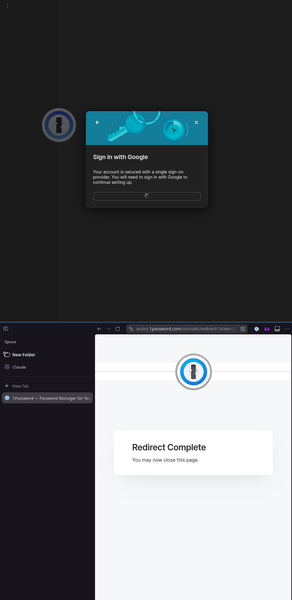
When trying to log in on an account behind Google SSO for business account on Linux, after I see the "Redirect Complete You may now close this page, my app just hang's on a spinner. 22:52:32 $ uname -srm Linux 6.14.0-37-generic x86_64 22:52:33 $ 1password --version 8.12.10 INFO 2026-04-20T02:47:03.526+00:00 runtime-worker(ThreadId(48)) [1P:app/op-app/src/app/backend/sso/oidc_verify.rs:87] SSO Authentication -- verifying OIDC redirect. INFO 2026-04-20T02:47:03.526+00:00 runtime-worker(ThreadId(48)) [1P:app/op-app/src/app/backend/sso/oidc_verify.rs:101] SSO Authentication -- sending a notification to B5x to close the identity provider's sign-in tab. INFO 2026-04-20T02:47:03.526+00:00 runtime-worker(ThreadId(48)) [1P:app/op-app/src/app/backend/sso/oidc_verify.rs:191] SSO Authentication -- calling B5's oidc/verify endpoint INFO 2026-04-20T02:47:03.811+00:00 runtime-worker(ThreadId(48)) [1P:app/op-app/src/app/backend/sso/oidc_verify.rs:1106] SSO Authentication -- B5 did not find device credentials for this user/account/device. Beginning enrollment. INFO 2026-04-20T02:47:03.811+00:00 runtime-worker(ThreadId(48)) [1P:app/op-app/src/app/backend/sso/mod.rs:789] Native messaging is not available, cannot use extension first SSO flow INFO 2026-04-20T02:47:03.811+00:00 runtime-worker(ThreadId(48)) [1P:app/op-app/src/app/backend/sso/oidc_verify.rs:795] SSO Authentication -- generating a device key for a new SSO device enrollment. INFO 2026-04-20T02:47:03.811+00:00 runtime-worker(ThreadId(48)) [1P:app/op-app/src/app/backend/sso/oidc_verify.rs:798] SSO Authentication -- attempting to begin device enrollment.22Views0likes1Comment
Nonprofit account setup blocked – no response from support
Hello I’m trying to set up a nonprofit account, but I haven’t been able to move forward because I haven’t received a response from support after multiple follow-ups. This is currently blocking us from getting started, and I’d really appreciate help connecting with the right person. I’m happy to share details privately if needed. Thank you!51Views0likes1Comment
Change Private Vault default name
Hello Everyone In our 1Password tenant, the default “Employee” vault has been setted at the start as “Dipendente”. For internal and cultural reasons, we would prefer to rename it to “Privato”, as this better reflects how we want employees to perceive and use the vault (i.e. as a personal/private space, even though it is managed by the organization). We are currently in an early deployment stage, with 1Password rolled out only to the IT department, and we plan to extend it company-wide soon. Being able to adjust this naming before the full deployment would help reduce confusion and improve adoption among end users. Thanks again for your support, and please let me know if we can do something.97Views0likes1CommentResearch opportunity: Help shape the future of 1Password + gift card for your time
Hey 1Password community 👋 Our team is running 1:1 research interviews with current 1Password Business customers, and we’d love your insights. We’re especially interested in hearing from folks using the 1Password Enterprise Password Manager (with or without 1Password Device Trust or 1Password SaaS Manager), and who are involved in managing access, identity, and device posture at their company. Our goal with this research is to better understand how access is managed in the real world, especially in places where SSO, IdPs, and MDMs may not reach. Your feedback will directly influence how we evolve our products and features going into 2025. Who we’re looking for: Admins, IT, or Security leads at companies with 500–3,000 employees in North America, Europe, or Australia Decision-makers, or those with hands-on experience managing access tools Current users of 1Password Business and/or Extended Access Management What to expect: A 60-minute live interview Flexible scheduling between August 4th and 15th A $100 gift card from popular retailers as a thank-you We only have 10 slots available, so if you’re interested, please fill out this short screener survey. Thanks for being part of the community, we’re excited to learn from you!84Views1like0Comments